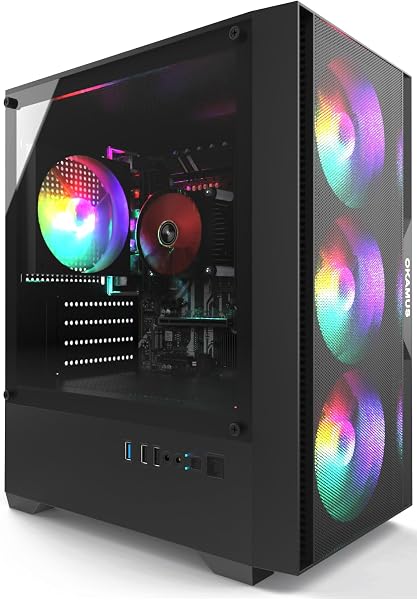
CyberPowerPC Gaming PC
8.0Editor scoreRyzen 5 5500 CPU
Radeon RX 6500 XT
8GB DDR4 RAM
500GB PCIe SSD
Compare 10 top budget gaming PCs by CPU, GPU, RAM, storage, and value. Find the right affordable prebuilt desktop for 1080p gaming and daily use.
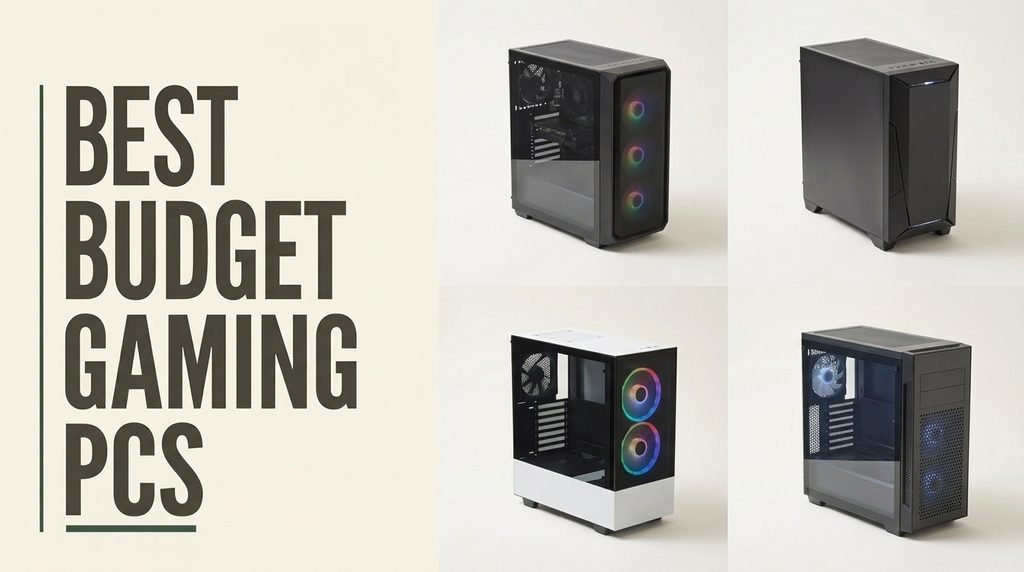
Finding a capable budget gaming desktop means balancing processor power, graphics card performance, RAM capacity, storage speed, included peripherals, and warranty support against your target games and resolution. We compare 10 standout prebuilt systems across price points from entry-level integrated-graphics machines up to mid-range builds with dedicated Radeon RX cards suitable for 1080p esports and mainstream titles.
The desktops in this guide range from compact Ryzen 5 systems built for everyday productivity with casual gaming headroom, up to configurations with Intel Core i7 processors, 32GB of RAM, and dedicated graphics that handle demanding titles at playable frame rates. Component balance matters more than any single spec, and understanding the tradeoffs helps you avoid overpaying for features you won’t use.
This guide breaks down each option with clear specs, honest pros and cons, and practical buying advice. Whether you need a plug-and-play system for Fortnite and Minecraft, a value-focused desktop for streaming and schoolwork, or a mid-range tower with upgrade room for future graphics cards, you will find a model that fits your gaming goals and your budget.
We compared 10 budget gaming desktops using the details that actually help a buyer decide: processor core count and generation, dedicated or integrated graphics performance, RAM capacity and speed, SSD size and interface, included peripherals, cooling and RGB design, wireless connectivity, power supply quality, upgrade potential, warranty terms, owner feedback, and overall value. The notes focus on practical trade-offs so each pick connects to how people actually game, stream, work, and multitask on an affordable prebuilt tower.

Compare key features, scores, and current prices side by side. A shorter feature list means fewer details were available, not necessarily fewer capabilities.



This Ryzen 5 5600GT system earns the highest owner rating in this guide at 4.8 stars, suggesting consistently strong satisfaction with its combination of modern CPU, quality power supply, and reliable connectivity. The Ryzen 5 5600GT delivers 6 cores and modern IPC performance that handles responsive web browsing, document creation, streaming, online learning, and daily productivity confidently.
We may earn a commission when you buy through this link, at no additional cost to you.
Integrated Radeon graphics support smooth everyday visuals without requiring a separate graphics card, and they can handle lighter esports titles and older games at reasonable settings. For users who split time between gaming and general computing, this balance makes sense. The 80 PLUS Bronze 600W ATX power supply stands out at this price, providing efficient operation and genuine headroom for adding a dedicated graphics card later.
Connectivity is particularly strong with Intel WiFi 6, Bluetooth, RJ-45 Ethernet, HDMI, VGA, 6 USB ports total, and 3 audio jacks. The dual display outputs with HDMI and VGA accommodate both modern and legacy monitors, which is useful for home office setups that reuse older displays. Front USB and audio ports make connecting peripherals convenient without reaching behind the tower.
A quality 600W Bronze power supply is one of the most valuable components a budget prebuilt can include because it directly affects both reliability and upgrade potential. Many cheap prebuilts cut costs on the PSU, leaving you unable to add a decent graphics card later without buying a new one. Starting with 600W Bronze means you can add most mid-range graphics cards without replacing the power supply.
This desktop is the right pick for buyers who prioritize reliable daily computing performance and want solid foundation hardware for a future graphics card upgrade. If you need gaming performance out of the box, the integrated graphics will limit you to lighter titles. For students, families, home offices, and users who game occasionally rather than seriously, this system delivers excellent value with the trust signal of exceptional owner ratings.
Dedicated gamers who need discrete graphics performance out of the box.
We may earn a commission when you buy through this link, at no additional cost to you.
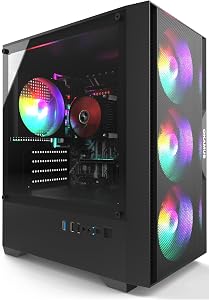
The CyberPowerPC Gaming PC earns the editor's pick in this guide thanks to a well-matched component set from a brand with real support infrastructure behind it. The AMD Ryzen 5 5500 provides 6 cores and 12 threads running at 3.6GHz, delivering solid performance for 1080p gaming, streaming, and productivity work. The modern B550 chipset supports current-generation NVMe storage and faster memory than older platforms.
We may earn a commission when you buy through this link, at no additional cost to you.
The dedicated Radeon RX 6500 XT with 4GB of VRAM provides meaningful gaming performance beyond integrated graphics, handling esports titles like Valorant, Rocket League, and League of Legends at high frame rates. For more demanding games, you’ll want to dial back settings or resolution, but the dedicated GPU opens up a much wider library of playable titles compared to integrated-only systems.
Storage uses a 500GB PCIe 4.0 NVMe SSD, which is faster than SATA SSDs found in many budget builds and provides enough space for Windows 11 Home, essential apps, and several AAA games before you need to add storage. Connectivity includes WiFi 5, Bluetooth 5.0, and a healthy mix of USB-A 3.2 and 2.0 ports for peripherals. The tempered side panel showcases the custom RGB lighting, and the bundled keyboard and mouse let you start gaming immediately.
CyberPowerPC has decades of experience building prebuilt gaming systems and offers established warranty and support networks. If something fails, you have a known channel for repair or replacement. Boutique and generic prebuilts often ship with similar components but lack the support infrastructure, which matters when problems arise months into ownership.
This desktop makes the most sense for buyers who want an established prebuilt brand, modern components, and a dedicated GPU without paying flagship prices. The 8GB RAM is the main limitation and the first upgrade most buyers should plan for, as 16GB has become the practical minimum for modern gaming. The 1-year parts and labor warranty with free lifetime tech support adds genuine value compared to boutique builders without support networks.
Buyers who need 16GB of RAM out of the box without a planned upgrade.
We may earn a commission when you buy through this link, at no additional cost to you.
This Pre-Built i5 Integrated system is the lowest-priced option in this guide and targets buyers who need a basic Windows gaming starter at the lowest possible cost. The i5 processor delivers decent frame rates for 1080p esports titles with modest settings, and the three black RGB fans provide the gaming aesthetic many buyers expect at this price point.
We may earn a commission when you buy through this link, at no additional cost to you.
The 256GB M.2 SSD offers fast boot times and quick application loads, though the capacity will fill quickly once you install Windows, a game or two, and essential software. The 8GB of RAM meets the minimum for current Windows gaming but will show its limits during multitasking, streaming, or more demanding titles. The matte black case and vertical-design CPU cooler provide a cleaner look than many entry-level builds.
Connectivity includes WiFi 6 and Bluetooth 5.3, which are notable at this price and ensure the system is ready for modern wireless peripherals and networks. The wide-voltage 400W power supply handles the integrated graphics configuration and leaves modest headroom for a low-power graphics card upgrade later. The absence of a dedicated GPU is the biggest limitation and defines what you can realistically play.
Starting with integrated graphics and planning a GPU upgrade later is a reasonable budget strategy, but verify the power supply has the right connectors and wattage before buying a card. A 400W supply limits you to lower-power cards like the GTX 1650 or RX 6400. More capable cards like RTX 3050 or RX 6600 typically need 500W or more.
This desktop makes sense for budget-constrained buyers who want to start with the computer, then save for a graphics card upgrade later. Expect to run less demanding titles like League of Legends, CS2, Valorant, Minecraft, and older esports games at modest settings. Students, families on tight budgets, and anyone transitioning from a laptop to a desktop will find value, but committed gamers should prioritize models with dedicated graphics even at slightly higher prices.
Buyers who want to play modern AAA games out of the box without upgrades.
We may earn a commission when you buy through this link, at no additional cost to you.
The STGAubron i7 RX 560 configuration stands out with 32GB of RAM, which is unusual at this price point and particularly useful for streamers, content creators, and multitaskers who run many applications simultaneously. Combined with the Intel Core i7 processor running up to 3.9GHz, the system handles streaming while gaming, video editing while browsing, and heavy multitasking that would bog down 8GB or 16GB systems.
We may earn a commission when you buy through this link, at no additional cost to you.
The AMD Radeon RX 560 4GB graphics card is older but still handles popular esports and mainstream titles like Fortnite, Valorant, CS2, Rocket League, and Minecraft at 1080p with reasonable settings. The 512GB SSD provides good capacity for Windows 11 Home and a modest game library, while WiFi 6 and Bluetooth 5.0 keep wireless performance current.
The RGB gaming aesthetic is prominent with three RGB fans and the included RGB mouse and keyboard, which is appealing for buyers who want the complete gaming setup look without buying peripherals separately. The 1-year parts and labor warranty with free lifetime tech support provides reasonable backup, though the 3.6-star owner rating suggests some buyers have experienced issues.
32GB of RAM becomes genuinely useful during streaming while gaming, running virtual machines, editing photos or videos while playing, or keeping many Chrome tabs open during gameplay. Standard gaming without these demands rarely uses more than 16GB. If you don’t stream or multitask heavily, the extra RAM provides headroom but no immediate benefit.
This desktop is a smart pick for streamers, content creators, and heavy multitaskers who prioritize RAM capacity over cutting-edge graphics performance. If you primarily game and don’t stream or multitask heavily, the extra RAM may be overkill and you’d be better served by systems with newer graphics cards. For users who juggle many apps during gaming or need the system for creative work, 32GB is a meaningful advantage.
Pure gamers who would benefit more from a newer dedicated graphics card.
We may earn a commission when you buy through this link, at no additional cost to you.
The STGAubron RX 580 1TB configuration offers one of the strongest graphics propositions at this price with an AMD Radeon RX 580 featuring 8GB of GDDR5 VRAM. The RX 580 is a proven card that handles 1080p gaming well across a wide range of titles including Fortnite, Call of Duty Warzone, GTA V, World of Warcraft, Apex Legends, and Elden Ring at 60 or more frames per second with reasonable settings.
We may earn a commission when you buy through this link, at no additional cost to you.
The Intel Core i7 processor running up to 3.9GHz pairs well with the dedicated graphics card and 16GB of DDR4 RAM, which hits the current sweet spot for modern gaming without the overkill of 32GB for pure gaming use. The 1TB SSD provides substantial storage for a serious game library, so you won’t need to constantly uninstall and reinstall large AAA titles to free up space.
Connectivity is comprehensive with WiFi 6, Bluetooth 5.0, 1 HDMI output, 3 DisplayPort outputs, and 1 DVI port, which means you can run multiple monitors from the dedicated graphics card for productivity or multi-screen gaming setups. The six RGB fans provide strong airflow for the system under load, though they also mean more fan noise during gaming than systems with fewer fans.
8GB of video memory remains sufficient for 1080p gaming across most current titles and provides headroom for texture-heavy games that would stutter on 4GB cards. The RX 580’s 8GB capacity means you can play most mainstream titles at reasonable settings without running out of video memory, which affects both frame rates and stability.
This desktop is the right pick for budget-conscious gamers who want genuine dedicated GPU performance and large storage capacity in one package. The RX 580 is older but delivers real gaming performance that integrated graphics simply cannot match. If you want a quieter system with fewer fans or need the latest GPU generation, consider other options, but for pure value in dedicated graphics gaming, this configuration delivers.
Buyers who prioritize the latest-generation graphics cards or quieter cooling.
We may earn a commission when you buy through this link, at no additional cost to you.
The STGAubron RX 580 512GB configuration offers the same AMD Radeon RX 580 with 8GB GDDR5 and Intel Core i7 processor as its 1TB sibling, but at a lower starting price thanks to the smaller 512GB SSD. For buyers who don't need massive game library storage immediately, the savings are meaningful and you can always add storage later.
We may earn a commission when you buy through this link, at no additional cost to you.
The RX 580 handles the same wide range of popular titles including Fortnite, Call of Duty Warzone, Escape from Tarkov, GTA V, LOL, Valorant, Apex Legends, Overwatch, CSGO, Minecraft, and Elden Ring at 60 or more frames per second. The Intel Core i7 up to 3.9GHz and 16GB of DDR4 RAM round out a balanced gaming configuration that avoids the common budget pitfalls of CPU or memory bottlenecks.
Connectivity includes WiFi 6, Bluetooth 5.0, HDMI, and DisplayPort outputs for modern monitors. The four RGB fans provide a middle ground between the three-fan budget builds and the six-fan model with the 1TB SSD, balancing cooling, noise, and visual impact. The included RGB gaming mouse and keyboard mean you can start playing immediately without buying peripherals.
A 512GB SSD requires more active management of your installed games than a 1TB drive. Keep only the games you’re actively playing installed, and uninstall completed titles promptly. For many players this rotation works fine because they focus on a few games at a time. For buyers who want their entire library always ready, step up to the 1TB version.
This desktop makes sense for buyers who want RX 580 gaming performance at the lowest possible price and are comfortable managing storage carefully or adding a secondary drive later. Modern AAA games can require 100GB or more each, so a 512GB SSD realistically holds Windows, essential apps, and 2 to 3 large games before needing attention. The 3.6-star rating is lower than ideal, so review current feedback carefully before purchasing.
Buyers who want to keep large game libraries installed simultaneously.
We may earn a commission when you buy through this link, at no additional cost to you.
The Dell OptiPlex Renewed configuration is the only option in this guide that includes a complete peripheral set with a 24-inch HDMI monitor, keyboard, mouse, and headset in the box. For buyers starting fresh without any computer accessories, this bundle eliminates the need to purchase separate items and provides a true out-of-box experience ready to use immediately.
We may earn a commission when you buy through this link, at no additional cost to you.
The Intel Core i7 Quad Core processor running at 3.40GHz combined with 16GB of RAM provides reliable performance for productivity work, web browsing, and lighter gaming. The 512GB SSD boots fast and provides enough storage for Windows 11 Pro, essential applications, and a modest game library. The GeForce GT 1030 2GB handles lighter titles like CS GO, DOTA 2, GTA V, and many esports games at reasonable settings.
The RGB LED light panel on the front with remote control adjustment adds a gaming aesthetic to the business-class OptiPlex chassis, bridging the gap between office PC and gaming rig. Windows 11 Pro provides additional features over Home like BitLocker encryption, Hyper-V virtualization, and advanced networking capabilities that benefit power users and professionals.
Renewed computers are inspected, cleaned, tested, and repackaged by qualified refurbishers. They work and look like new but typically carry shorter warranties than fresh systems. For buyers who want the bundled accessories and are comfortable with professionally refurbished hardware, renewed systems offer meaningful savings while still providing functional reliability.
This desktop is the right pick for buyers who need a complete setup without the hassle of sourcing peripherals and don’t mind a renewed system that has been professionally inspected and tested. The GT 1030 is entry-level graphics that will limit modern AAA gaming, so this works best for esports, older games, and productivity-focused use. The 90-day warranty is shorter than new systems but reasonable for the renewed category and bundled accessories.
Buyers who want new condition hardware or stronger gaming graphics performance.
We may earn a commission when you buy through this link, at no additional cost to you.
The Suevery prebuilt desktop combines the Ryzen 5 3400G APU with 16GB of DDR4 memory and a clear upgrade path that appeals to buyers who want to start affordable and expand over time. The quad-core, eight-thread processor features integrated Radeon RX Vega 11 graphics with a base clock of 3.7GHz and boost up to 4.2GHz, handling office software, web browsing, video calls, and casual 1080p gaming without a dedicated card.
We may earn a commission when you buy through this link, at no additional cost to you.
The 16GB of DDR4 memory supports smooth multitasking for office work, online classes, and media streaming, while the 256GB SSD boots up quickly and loads programs much faster than traditional hard drives. The expansion slots for both memory and storage mean you can grow the system as your needs evolve, and the manufacturer specifically notes that cards like the RTX 3050 or RX 5060 can be added for high refresh rate gaming.
The elegantly designed desktop features stunning RGB lighting effects controlled by a switch or disabled entirely for a cleaner look. Multiple RGB fans provide efficient heat dissipation while keeping noise levels manageable. Connectivity includes USB 3.0, USB 2.0, HDMI, audio jacks, and Ethernet for comprehensive peripheral support, plus WiFi 6 for faster wireless networking than previous generation standards.
APUs like the Ryzen 5 3400G combine CPU and integrated graphics in one chip, which lets you build a complete system without a dedicated GPU. When you add a graphics card later, the integrated graphics simply become unused rather than wasted. This makes APU-based systems particularly good starting points for budget builds that will grow over time.
This desktop is a strong pick for buyers who want to start with a capable base system and plan to add a dedicated graphics card and more storage over time. The 4.2-star owner rating suggests reliable real-world performance, and the plug-and-play setup makes it accessible for less technical users. Pure gamers who want AAA performance out of the box should look at models with dedicated graphics, but as an upgrade platform, this delivers excellent value.
Buyers who need AAA gaming performance immediately without future upgrades.
We may earn a commission when you buy through this link, at no additional cost to you.
The STGAubron i5 RX 560 configuration provides a balanced entry into dedicated graphics gaming at a lower price point than the i7 variants in the same product line. The Intel Core i5 processor running up to 3.6GHz paired with 16GB of RAM handles modern gaming workloads confidently without the premium of an i7 CPU that benefits mainly heavy multitasking and streaming.
We may earn a commission when you buy through this link, at no additional cost to you.
The AMD Radeon RX 560 with 4GB of GDDR5 is older but still capable of running the popular esports and mainstream titles that budget gamers prioritize, including Fortnite, Call of Duty Warzone, GTA V, LOL, Valorant, Apex Legends, Roblox, Overwatch, CSGO, Minecraft, and Rocket League at 60 or more frames per second with reasonable settings.
Connectivity includes WiFi 6, Bluetooth 5.0, HDMI, and DisplayPort outputs for modern monitors. The three RGB fans provide adequate cooling with a quieter profile than six-fan configurations, and the included RGB gaming mouse and keyboard mean you can start playing immediately without purchasing peripherals separately.
For pure gaming at 1080p with mid-range graphics cards, Intel i5 processors generally match or come very close to i7 performance because games rarely use all available CPU threads. The i7 advantage becomes meaningful during streaming, video editing, or heavy multitasking. If you only game, saving money with an i5 and investing the difference elsewhere often makes sense.
This desktop is a sensible pick for budget-conscious gamers who want dedicated graphics performance at an entry price and don’t need the Intel i7’s extra multithreading capacity. The 3.5-star owner rating suggests mixed experiences, so read current feedback carefully. For esports and mainstream gaming on a budget, this configuration delivers more than integrated-only systems while costing less than i7-powered alternatives in the same product family.
Streamers or content creators who benefit from i7 multithreading performance.
We may earn a commission when you buy through this link, at no additional cost to you.
This Ryzen 5 5600GT 1TB configuration is the upgraded sibling to the 4.8-star rated 5600GT system earlier in this guide, adding 16GB of RAM and a 1TB SSD for buyers who want more memory and storage headroom. The 4.6-star rating remains strong, and the component upgrades make it a better daily driver for users who multitask heavily or need substantial storage capacity.
We may earn a commission when you buy through this link, at no additional cost to you.
The AMD Ryzen 5 5600GT running at 3.6GHz delivers 6 cores of responsive performance for everyday computing, office productivity, online learning, web browsing, and multimedia playback. Integrated AMD Radeon Graphics support everyday visual tasks and media playback, and they can handle lighter gaming titles at reasonable settings. The 16GB of DDR4 RAM meets the current standard for comfortable Windows multitasking.
The 1TB PCIe SSD provides quick startup and comfortable file storage for productivity work, media libraries, and a modest game collection. Intel WiFi 6 AX200 and Bluetooth provide flexible wireless connectivity, and rear HDMI, VGA, PS/2, USB, Ethernet, and audio connections support a wide range of displays, networks, and peripherals. The 80 PLUS Bronze 600W power supply handles the system efficiently and provides headroom for a future graphics card.
The upgrade from 8GB to 16GB RAM and 256GB to 1TB storage transforms the system from a basic computer into a comfortable daily driver. 16GB handles modern Windows multitasking without constant memory pressure, and 1TB storage lets you keep a reasonable game library installed without constant management. For most buyers, these upgrades are worth the price difference.
This desktop is the right pick for buyers who want a modern Ryzen platform with meaningful RAM and storage for daily computing, with the option to add a dedicated graphics card later for serious gaming. The B350 chipset is older but reliable, and the 600W Bronze PSU is a particular highlight that enables future GPU upgrades. For home offices, students, families, and users who game occasionally rather than seriously, this system delivers excellent value with reliability signals from strong owner feedback.
Buyers who want immediate AAA gaming performance without adding a graphics card.
We may earn a commission when you buy through this link, at no additional cost to you.
Picking the right budget gaming desktop means balancing processor power, graphics capability, RAM, storage, upgrade potential, and brand reliability against your actual gaming goals and target resolution. Here is what to prioritize before you buy.
The processor is the brain of your gaming PC and affects everything from frame rates in CPU-dependent games to how smoothly background tasks run while gaming. Modern budget gaming CPUs come primarily from AMD Ryzen 5 and Intel Core i5 or i7 lines. The Ryzen 5 5500 and 5600GT shown in this guide represent current AMD options, while Intel i5 and i7 processors cover a range of generations in budget prebuilts.
Core count matters because modern games increasingly use multiple CPU cores. Six cores has become the sweet spot for current gaming, delivering strong performance without the premium of 8-core or higher chips that mainly benefit professional workloads. CPU clock speed also matters, with 3.5GHz or higher base clocks providing responsive performance across games and productivity apps.
For pure gaming, a modern 6-core Ryzen 5 or Intel i5 is usually enough. If you stream, record gameplay, or multitask heavily during games, an i7 or Ryzen 7 provides meaningful advantages. Don’t pay for high-end CPUs if you only game at 1080p with a modest graphics card, as the GPU will be the bottleneck.
The graphics card has the biggest impact on gaming performance of any component. Prebuilt budget systems range from integrated graphics only, through older dedicated cards like the RX 560 and GT 1030, up to current-generation cards like the RX 6500 XT. Each tier targets different games and settings, and matching the GPU to your actual game library matters more than chasing specs.
Integrated graphics in modern CPUs can handle esports titles like Fortnite, Valorant, LOL, and CS2 at 1080p with modest settings. They struggle with demanding AAA games like Elden Ring, Call of Duty, or Cyberpunk at playable frame rates. Entry-level dedicated cards like the RX 560 or GT 1030 improve esports performance and add some capability for lighter AAA games, while cards like the RX 6500 XT handle most mainstream games at 1080p with medium to high settings.
Identify the games you actually plan to play before choosing. For esports and older titles, integrated or entry-level dedicated graphics work fine. For modern AAA games, prioritize at least an RX 6500 XT or equivalent, and plan for upgrades if you want higher settings or 1440p gaming.
16GB of DDR4 RAM has become the practical minimum for comfortable modern gaming, giving you headroom for Windows, your game, and background applications simultaneously. 8GB systems like the CyberPowerPC base configuration will work but will show their limits in demanding games and multitasking scenarios, making 16GB a near-essential first upgrade.
32GB RAM like the STGAubron i7 RX 560 configuration provides substantial headroom for streaming while gaming, running virtual machines, heavy multitasking, or professional creative work. For pure gaming without these demands, 32GB offers headroom but limited immediate benefit. The sweet spot for most gaming budgets is 16GB with the option to upgrade later.
If you can only afford one upgrade on an 8GB system, make it RAM. Modern games increasingly expect 16GB and performance drops noticeably when you run out. For streamers and content creators, consider 32GB from the start to avoid upgrading twice.
NVMe SSD storage is now standard even in budget prebuilts, delivering fast boot times and quick game loading that transforms the user experience compared to older hard drive-based systems. Storage capacity varies widely in this guide, from 256GB entry-level drives through 500GB and 512GB mid-range, up to 1TB in the top configurations.
256GB fills quickly after installing Windows, essential apps, and 1 to 2 modern games, requiring active management of what you keep installed. 512GB covers Windows plus a modest game library of 3 to 5 titles depending on size. 1TB provides comfortable room for a serious game library without constant uninstalling. PCIe 4.0 NVMe drives like the CyberPowerPC’s 500GB SSD offer faster speeds than PCIe 3.0 drives, though both are far faster than SATA SSDs.
For most gamers, 512GB is the practical minimum and 1TB is strongly preferred if your budget allows. Expanding storage later with additional NVMe or SATA SSDs is straightforward on any desktop with available M.2 slots or drive bays.
The power supply is one of the most important and most overlooked components in a prebuilt PC. Low-quality PSUs can fail, deliver unstable power that affects component longevity, or lack the wattage and connectors needed for future upgrades. 80 PLUS Bronze certified supplies like the 600W Bronze PSU in the Ryzen 5 5600GT configurations represent genuine quality at this price point.
Wattage matters for upgrade potential. A 400W PSU limits you to lower-power graphics cards like the GTX 1650 or RX 6400 if you want to upgrade later. A 600W or higher PSU supports most mid-range cards including RTX 3050, RX 6600, and RX 6650 XT without replacement. For buyers planning future upgrades, prioritizing a system with a 500W or higher quality PSU is worth paying extra.
If a prebuilt doesn’t disclose the PSU wattage or quality tier, be cautious. Reliable builders like CyberPowerPC and the Ryzen 5 5600GT systems in this guide specify their PSU details because quality power supplies are a selling point.
Modern prebuilts should include WiFi 6 or newer and Bluetooth 5.0 or higher for current wireless performance. USB port variety matters for connecting peripherals, external storage, and VR headsets. Front panel USB and audio ports provide convenient access without reaching behind the tower. Multiple video outputs on the graphics card enable multi-monitor setups useful for productivity and streaming.
Included peripherals vary significantly. Some systems ship with RGB gaming mice and keyboards, while others expect you to supply your own. The Dell OptiPlex Renewed includes a complete package with monitor, keyboard, mouse, and headset, which eliminates separate purchases for buyers starting fresh. Evaluate whether included peripherals meet your needs or if you’ll replace them anyway, which affects true value.
If you already own peripherals you like, don’t pay extra for bundled options you won’t use. If you’re starting completely fresh, bundles save money and simplify setup.
Warranty terms vary widely between budget prebuilt builders. Established brands like CyberPowerPC and Dell offer standard 1-year parts and labor warranties with established support channels. Boutique builders often match these terms but may have less reliable support networks when problems arise. Renewed systems typically carry shorter 90-day warranties but include the inspection and refurbishment of professional refurbishers.
Free lifetime tech support claims appear frequently in budget prebuilts and provide genuine value for less technical users who may need help troubleshooting Windows issues, driver conflicts, or hardware questions. Owner ratings often reflect support quality, so pay attention to feedback about customer service responsiveness and problem resolution.
For first-time PC buyers, prioritize systems from established brands with real support infrastructure. For experienced users comfortable troubleshooting hardware, boutique builds with better specs for the money may be worth the support tradeoff.
When you first unbox a new gaming desktop, position it in a well-ventilated area with at least 4 inches of clearance behind the tower for airflow, and avoid putting it directly on carpet that can block bottom intake vents. Connect your monitor to the dedicated graphics card’s HDMI or DisplayPort output rather than the motherboard’s video ports, which only route through integrated graphics. Install Windows updates and the latest graphics drivers from NVIDIA or AMD immediately after setup, as these dramatically affect gaming performance and system stability.
During regular use, keep the system clean inside and out. Dust accumulation is the primary cause of thermal issues and reduced performance over time. Use a can of compressed air every 2 to 3 months to clear dust from fan intakes, exhausts, and the heatsinks on your CPU and graphics card. Monitor your component temperatures with free tools like MSI Afterburner or HWMonitor, and investigate if CPU or GPU temperatures regularly exceed 85 degrees Celsius under load. Keep your software updated, including games, drivers, and Windows itself, as updates often include performance improvements and security fixes.
For long-term care and upgrades, plan component additions strategically based on your usage patterns. The first upgrade on most budget systems should be RAM to 16GB if you started with 8GB, followed by additional storage if you fill the included drive. Graphics card upgrades require checking that your power supply has adequate wattage and the correct connectors. Keep your PC away from direct sunlight and extreme temperatures, use a quality surge protector or UPS to protect against power events, and back up important files regularly to external storage or cloud services. Most budget prebuilts can serve reliably for 4 to 6 years with proper care, and modular upgrades can extend useful life well beyond that.
Yes, modern budget gaming PCs with dedicated graphics cards can play most current games at 1080p with reasonable settings. Systems with integrated graphics only handle esports titles like Fortnite, Valorant, and League of Legends well but struggle with demanding AAA games. Models with dedicated cards like the Radeon RX 6500 XT, RX 580, or RX 560 open up a much wider game library at playable frame rates.
16GB of DDR4 RAM is the current practical minimum for comfortable modern gaming. 8GB systems like entry-level prebuilts will work but struggle with demanding games and multitasking. 32GB provides headroom for streaming while gaming, content creation, and heavy multitasking but offers limited immediate benefit for pure gaming. If you can only upgrade one component, prioritize RAM to 16GB.
Prebuilt gaming PCs offer convenience, included warranty coverage, and the ability to start gaming immediately without technical knowledge. Building your own PC often provides better components for the money and the satisfaction of customization but requires research, assembly skills, and self-troubleshooting. For first-time buyers or those uncomfortable with hardware, prebuilts are the safer choice. For technical enthusiasts, DIY builds offer more value.
Integrated graphics are built into the CPU and share system RAM, providing basic gaming capability for lighter titles. Dedicated graphics cards have their own processor and video memory, delivering significantly better gaming performance. Modern integrated graphics like AMD Radeon Vega 11 can run esports games at 1080p with modest settings, while dedicated cards like RX 580 handle mainstream AAA games at 60 or more frames per second.
256GB fills quickly after installing Windows, essential applications, and 1 to 2 modern games. Modern AAA titles can require 100GB or more each, so 256GB requires active management of what you keep installed. For comfortable gaming without constant uninstalling, 512GB is the practical minimum and 1TB is strongly preferred if your budget allows.
Most prebuilt gaming PCs allow component upgrades including RAM, storage, and graphics cards. Check the power supply wattage before planning GPU upgrades, as low-wattage PSUs limit your options. The CPU is harder to upgrade because it depends on the motherboard socket. For maximum upgrade potential, choose systems with quality 500W or higher power supplies and available expansion slots.
Both AMD Ryzen and Intel Core processors deliver strong gaming performance in current generations. AMD Ryzen often offers more cores and better value at budget price points, while Intel historically led in single-core performance that affects some games. For most 1080p gaming with budget graphics cards, the GPU bottlenecks performance long before the CPU matters. Choose based on specific chip performance rather than brand loyalty.
WiFi 6 provides faster wireless speeds and better performance in crowded network environments than older WiFi 5. For competitive online gaming, wired Ethernet remains the preferred connection because it offers the lowest latency. If you must use wireless, WiFi 6 provides better performance than previous standards. Most prebuilts now include WiFi 6, making it a non-issue for current purchases.
A well-maintained budget gaming PC typically provides 4 to 6 years of useful service with modular upgrades extending useful life further. The graphics card usually becomes the first bottleneck as games demand more performance, and upgrading the GPU can refresh gaming capability without replacing the entire system. Regular cleaning, driver updates, and quality power delivery through a UPS or surge protector extend component lifespan.
Renewed computers are professionally inspected, tested, and refurbished to work and look like new. They typically carry shorter 90-day warranties compared to new systems but offer meaningful cost savings. For buyers comfortable with refurbished hardware and the shorter warranty window, renewed systems like the Dell OptiPlex can provide good value. Verify the refurbishment process and warranty terms before purchasing.
The CyberPowerPC Gaming PC stands out as the strongest overall choice for most budget gaming buyers, combining a modern AMD Ryzen 5 5500 processor with a dedicated Radeon RX 6500 XT graphics card, PCIe 4.0 NVMe storage, and the backing of an established prebuilt brand with real warranty support. Its component balance delivers meaningful 1080p gaming performance beyond integrated graphics while maintaining a reasonable price, and the 1-year parts and labor warranty with free lifetime tech support adds genuine peace of mind for first-time buyers.
For buyers who prioritize dedicated graphics performance in older-generation hardware, the STGAubron RX 580 1TB configuration offers 8GB of VRAM and 1TB of storage at an aggressive price. The two Ryzen 5 5600GT systems earn the highest owner ratings in this guide at 4.8 and 4.6 stars, providing modern CPU performance with a quality 600W Bronze PSU that supports future GPU upgrades. Buyers who need a complete setup with monitor and peripherals should consider the Dell OptiPlex Renewed, while the Suevery Ryzen 5 3400G offers an excellent upgrade foundation for buyers who plan to add a graphics card later. For the lowest possible entry price, the Pre-Built i5 Integrated system covers basic esports gaming on a tight budget.
Start by honestly assessing which games you actually plan to play and at what resolution. Esports and older titles work well on integrated graphics systems, while modern AAA games require dedicated GPUs. Prioritize 16GB of RAM, verify the power supply quality if you plan GPU upgrades, and factor in warranty support based on your technical comfort level. The right budget gaming PC gets you playing immediately while leaving room to grow. Any system in this guide can be the right choice for the right buyer when matched to realistic gaming goals and expectations.