HP OmniStudio 27
9.0Editor scoreAMD Ryzen AI 7
27-inch FHD IPS display
16GB fast DDR5 memory
512GB solid state drive
Discover the 10 best all in one computers for home and office. Compare display clarity, AI performance, integrated audio, webcams, and space-saving designs.
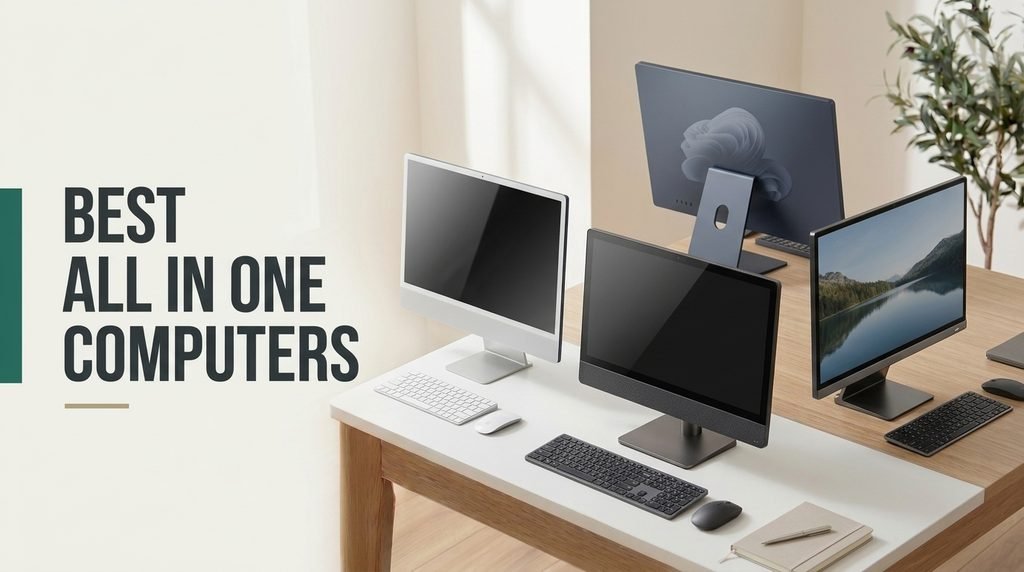
Find the right all in one computers for 2026. We compare 10 standout options by the factors that matter in this category, such as display fidelity, processing efficiency, webcam and microphone integration, audio performance, desk ergonomics, owner feedback, value, and everyday clutter trade-offs across modern work and family environments.
All-in-one computers have transformed from basic space-savers into formidable computing hubs featuring dedicated artificial intelligence engines, high-refresh displays, and studio-grade conferencing hardware. Eliminating the bulky floor tower simplifies cable management dramatically, creating a clean, organized desk setup that enhances productivity while blending seamlessly into contemporary home and office spaces.
Choosing the ideal all-in-one machine requires balancing screen size and visual fidelity against internal computing headroom and storage flexibility. From compact 22-inch units for tight spaces to expansive 27-inch powerhouses built for creative tasks and administrative workflows, this guide provides clear, practical research to help you make an informed investment.
We compared 10 all-in-one computers using the factors that directly shape the user experience: display size and color accuracy, processor and graphics efficiency, memory responsiveness, webcam resolution, acoustic profiles, cable management, port placement, owner feedback, and overall value. Our analysis evaluates real-world trade-offs between space-saving convenience and long-term expandability so each recommendation matches how people actually work, study, and entertain at home.


Compare key features, scores, and current prices side by side. A shorter feature list means fewer details were available, not necessarily fewer capabilities.





Designed to offer maximum utility and local capacity at an accessible price point, this all-in-one desktop represents an outstanding value proposition for home offices, remote learning, and family computing. It solves the common complaint of cramped storage by pairing a full terabyte of solid-state room with a generous memory footprint.
We may earn a commission when you buy through this link, at no additional cost to you.
The computer is powered by an efficient Intel N100 quad-core processor capable of boosting up to 3.40GHz, matched with 16GB of system RAM. This setup handles routine office chores, browser-based applications, and multi-tab research with consistent reliability. The standout 1TB PCIe M.2 SSD provides cavernous storage for family photo archives, large document libraries, and multimedia projects without relying on external drives.
Visuals and acoustics are notably elevated for a value-focused machine. The expansive display features low blue-light technology for comfortable viewing, paired with integrated stereo speakers tuned by Harman for rich, cinema-quality acoustic clarity. For remote video meetings, the system incorporates a sharp 5MP camera enhanced by Lenovo Smart Meeting artificial intelligence, which works alongside Smart Noise Cancelling to filter out disruptive ambient background noise.
Unlike typical tinny desktop monitor speakers, the Harman-tuned audio drivers deliver balanced highs and clear dialogue for movies and calls. The 5MP camera features AI-assisted background framing and directional noise reduction, ensuring you look and sound crisp on Zoom and Microsoft Teams meetings.
Users seeking a workstation for heavy 4K video rendering or high-framerate 3D gaming will need a machine with dedicated graphics hardware. However, for everyday users, remote workers, and families wanting generous local storage, excellent sound quality, and smooth day-to-day productivity, this model delivers unbeatable balance.
Demanding users who need high-intensity computational rendering or 3D gaming power.
We may earn a commission when you buy through this link, at no additional cost to you.
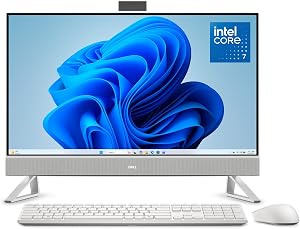
Engineered for demanding home offices, content creators, and busy multi-taskers, this 27-inch all-in-one desktop combines an expansive display area with cutting-edge artificial intelligence processing. It is built to serve as a complete digital nerve center, eliminating cable clutter while supplying ample visual space to organize multiple documents, browser windows, and collaborative workspaces side by side.
We may earn a commission when you buy through this link, at no additional cost to you.
Performance is anchored by the AMD Ryzen AI 7 445 processor paired with AMD Radeon 840M graphics and 16GB of rapid DDR5 memory. This processing platform provides dedicated neural acceleration, allowing background tasks such as real-time audio filtering and smart video framing to execute independently without burdening primary CPU cores. A 512GB PCIe NVMe M.2 solid-state drive ensures virtually instantaneous system boots, rapid file transfers, and snappy software responsiveness.
Daily communication is elevated through an intelligent FHD infrared camera equipped with HDR auto-switching, which actively balances difficult backlighting from office windows so you remain clearly visible during video conferences. Dual microphones use artificial intelligence noise reduction to suppress household background distractions, while integrated DTS Sound Unbound audio delivers rich spatial sound for streaming music, watching films, and attending calls. HP Eye Ease blue-light filtering preserves color accuracy while preventing visual fatigue during extended sessions.
The integrated FHD IR camera pairs with Windows Hello to enable secure, hands-free facial recognition logins the moment you sit down. Intelligent background noise cancellation and HDR image balancing ensure your video meetings look polished and distraction-free, regardless of background chatter or harsh sunlight.
While demanding graphic designers might prefer a higher native resolution than Full HD on a 27-inch panel, the display provides vivid colors and wide viewing angles that excel for everyday productivity. For professionals seeking modern AI assistance, clean single-cord desk organization, and comprehensive multimedia capabilities, this desktop represents an outstanding primary workstation.
Graphic designers who require ultra-high-density 4K resolution displays.
We may earn a commission when you buy through this link, at no additional cost to you.
Designed specifically for quiet home offices, bedrooms, study nooks, and communal family spaces, this 23.8-inch desktop focuses on peaceful, distraction-free productivity. Its standout quality is a passive, fanless internal architecture that eliminates whirring cooling fans entirely, allowing you to study, write, or browse the web in absolute tranquility.
We may earn a commission when you buy through this link, at no additional cost to you.
Under the hood, an energy-efficient Intel quad-core processor works alongside an upgraded 16GB of DDR5 memory. This significant memory buffer allows users to keep dozens of browser tabs open, stream background music, and navigate administrative software without experiencing typical entry-level slowdowns. The responsive hardware handles school assignments, spreadsheets, and web research with consistent fluid execution.
The 23.8-inch Full HD IPS panel features slim three-sided bezels that maximize screen real estate while keeping desk footprint compact. For video calls, a 1080p pop-up camera with dual microphones delivers crisp imagery, tucking completely inside the chassis when not in use for assured physical privacy. With built-in Wi-Fi 6 connectivity and bundled white peripherals, setting up requires only plugging in the power cable.
The absence of internal mechanical fans means the system produces zero acoustic noise and draws significantly less household dust over time. The spring-loaded pop-up webcam provides guaranteed visual privacy by physically tucking away when work concludes, offering total peace of mind in shared bedrooms or living spaces.
The integrated 128GB UFS storage is lean, making cloud storage or an external drive advisable for buyers storing large multimedia libraries. However, for students, remote administrative workers, and households wanting a completely silent, elegant computer for daily tasks, this system is exceptionally pleasant to use.
Users with large local collections of offline videos, games, or media archives.
We may earn a commission when you buy through this link, at no additional cost to you.
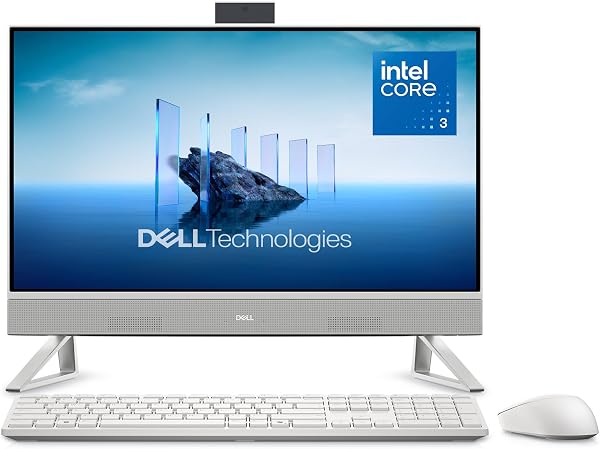
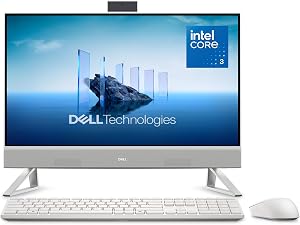
Aimed at home offices, creative hobbyists, and family workstations, this 23.8-inch desktop delivers a noticeably superior audio-visual experience compared to standard budget desktops. It pairs an accurate, high-contrast color panel with advanced sound engineering, making photo editing, multimedia streaming, and client video meetings equally engaging.
We may earn a commission when you buy through this link, at no additional cost to you.
Processing is powered by the Intel Core 3 100U processor, delivering efficient multi-threaded performance for everyday office applications, cloud collaboration platforms, and web browsing. Windows 11 Home provides a clean desktop interface with intuitive snap layouts, while the system’s responsive architecture ensures that switching between applications remains fluid throughout the workday.
The centerpiece of this machine is its Full HD IPS screen, which features 99% sRGB color gamut coverage and 50% higher contrast within an ultra-narrow bezel frame. Dell ComfortView Plus reduces harmful blue light without altering true color fidelity, complemented by a higher refresh rate that makes document scrolling feel exceptionally smooth. Dual Bluetooth speakers tuned with Dolby Atmos spatial sound provide impressive acoustic depth, and the 5MP HDR infrared camera ensures sharp video quality even in dimly lit rooms.
With 99% sRGB coverage and enhanced contrast, this display makes web media, digital photos, and spreadsheets appear crisp and color-accurate. Dell includes one year of onsite service coverage, providing rapid in-person technician assistance if hardware issues arise, which is a major advantage for home-based professionals.
Power users compiling complex databases or executing 3D simulations will want a higher-tier processor class. Nevertheless, for users seeking accurate visual reproduction, exceptional video conferencing clarity, and reliable onsite warranty backing, this Dell all-in-one is a polished, dependable contender.
Enthusiasts requiring heavy computing horsepower for 3D modeling or video production.
We may earn a commission when you buy through this link, at no additional cost to you.
Engineered for compact urban apartments, kitchen command centers, dorm desks, and retail service counters, this 21.5-inch all-in-one proves that capable computing does not require sacrificing tabletop space. Its petite profile fits comfortably on narrow desks where larger 24-inch or 27-inch displays would prove overwhelming.
We may earn a commission when you buy through this link, at no additional cost to you.
An Intel N100 quad-core processor running alongside 8GB of modern DDR5 memory provides responsive performance for everyday computing tasks, including web browsing, document drafting, online banking, and video streaming. The storage setup combines a responsive internal 128GB SSD for the operating system and key applications with an included 256GB storage card configured through the docking hub, providing 384GB of practical total storage.
The 21.5-inch Full HD anti-glare panel produces sharp text and comfortable contrast, while an adjustable stand tilts between -6 and 21 degrees to help you dial in ergonomic sightlines. To overcome the port limitations common in smaller all-in-ones, HP bundles an 8-in-1 docking hub featuring USB-C, multiple USB-A ports, HDMI, Ethernet, and card slots. Audio is tuned by DTS Audio, and integrated Wi-Fi 6 keeps networking fast and dependable.
The external docking hub effectively solves the challenge of connecting peripherals to compact all-in-one machines, placing USB ports and card readers within easy reach on your desk. The wide tilt range allows users of varying heights to achieve comfortable viewing without neck strain.
Users juggling intense multitasking workflows across dozens of resource-heavy programs will find 8GB of RAM limiting over time. However, for everyday household administration, student homework, and space-constrained workspaces, this modular, compact package offers tremendous convenience and functionality.
Heavy multitaskers who frequently run extensive professional creative suites.
We may earn a commission when you buy through this link, at no additional cost to you.
Combining Scandinavian-inspired cotton white aesthetics with a generous 27-inch display canvas, this desktop is built for home offices and open-concept living spaces where appearance matters just as much as computing performance. It transforms the computer from a utilitarian black box into an attractive decorative focal point that elevates the room's atmosphere.
We may earn a commission when you buy through this link, at no additional cost to you.
Under the elegant exterior, an AMD Ryzen 5 220 processor operates alongside integrated AMD Radeon 740M graphics and 16GB of DDR5 memory. This hardware configuration effortlessly powers everyday office multitasking, photo manipulation, casual gaming, and smooth high-definition video playback. The 512GB PCIe NVMe solid-state drive delivers rapid application launching and responsive file management.
The large Full HD display features HP Eye Ease low-blue-light filtering to prevent eye strain during long working hours without compromising color accuracy. For remote communications, the system includes an FHD infrared camera featuring HDR auto-switching that balances challenging backlight conditions, paired with Windows Hello facial recognition. DTS Sound Unbound spatial audio provides rich, multi-dimensional sound that makes music and movies feel lifelike.
The cotton white finish and minimalist stand create an airy, modern desk appearance that avoids the dark, industrial feel of conventional PCs. Integrated DTS Sound Unbound spatial processing delivers clear directional audio, filling home offices with rich sound without external desktop speakers.
As with other 27-inch Full HD displays, pixel density is lower than specialized 4K monitors, meaning fine creative typography requires closer inspection. Yet, for users seeking an aesthetically stunning, wide-screen workstation that blends beauty with reliable multi-core computing power, this desktop is a delight to own.
Shoppers with restricted desk surface area or those who prefer dark hardware finishes.
We may earn a commission when you buy through this link, at no additional cost to you.
Tailored for modern home office professionals, remote administrative staff, and busy academic workstations, this 23.8-inch all-in-one focuses on practical everyday versatility. It bridges the gap between compact physical dimensions and expansive capability by pairing responsive DDR5 memory with high-speed 10Gbps peripheral ports.
We may earn a commission when you buy through this link, at no additional cost to you.
The system is powered by an updated Intel N150 quad-core processor capable of reaching up to 3.6GHz, complemented by 16GB of DDR5 memory. This setup supports smooth multitasking across spreadsheets, browser sessions, and communications software without noticeable lag. Storage is cleverly arranged with an internal 128GB UFS system drive paired with a bundled 500GB external flash drive, giving users 628GB of nominal storage space for files, media archives, and backups.
Physical connectivity is robust, featuring high-speed 10Gbps USB-C and USB-A ports alongside standard peripheral ports, HDMI output, and gigabit Ethernet. The 23.8-inch Full HD anti-glare display incorporates HP Eye Ease to reduce visual fatigue, while the 1080p webcam features a mechanical privacy shutter so you can physically block the lens when meetings conclude. Dual stereo speakers deliver crisp vocal reproduction for calls and media.
With 10Gbps USB-C and USB-A connectivity, transferring large project files to external storage occurs in seconds rather than minutes. The mechanical camera shutter provides guaranteed physical privacy at the flip of a switch, ensuring no unwanted video feeds occur when the camera is not in use.
While having storage split between an internal drive and an external flash unit requires a bit of thoughtful file organization, the overall capacity and connectivity are outstanding for the price. For remote workers who require reliable video conferencing, multiple high-speed ports, and smooth multitasking, this desktop is a dependable productivity hub.
Users who prefer a single undivided internal solid-state drive for file storage.
We may earn a commission when you buy through this link, at no additional cost to you.
Engineered for small business offices, accounting cubicles, medical intake desks, and remote corporate employees, this 21.5-inch all-in-one delivers enterprise-grade operating features within a remarkably compact chassis. It provides the security, management protocols, and network compatibility required for commercial environments without demanding substantial desk space.
We may earn a commission when you buy through this link, at no additional cost to you.
Operating on an Intel N100 quad-core processor running up to 3.4GHz with 8GB of DDR5 memory, this PC easily handles business software, cloud CRM tools, database entry, and web portal access. The pre-installed Windows 11 Pro operating system provides crucial commercial benefits, including BitLocker encryption to protect sensitive corporate data and native Remote Desktop host functionality for hybrid working.
The 21.5-inch Full HD anti-glare screen ensures clear text and comfortable viewing in brightly lit commercial offices. A built-in HD webcam includes a sliding privacy shutter for secure video meetings, while integrated stereo speakers provide clear dialogue. Port selection includes a modern USB Type-C port, several USB-A connections, HDMI output for an auxiliary display, gigabit Ethernet, and modern Wi-Fi 6 wireless networking.
Windows 11 Pro delivers robust encryption tools like BitLocker, which secures client data and financial records against unauthorized access. Seamless domain joining and group policy support make this compact machine an easy addition to managed corporate IT environments.
The 128GB storage capacity is modest, meaning cloud-dependent businesses or companies with dedicated network servers will benefit most. For corporate branches, reception desks, and remote professionals seeking an affordable, secure Windows 11 Pro workstation with a tiny footprint, this desktop delivers proven commercial utility.
Users with massive local video archives or those needing more than 8GB of system RAM.
We may earn a commission when you buy through this link, at no additional cost to you.
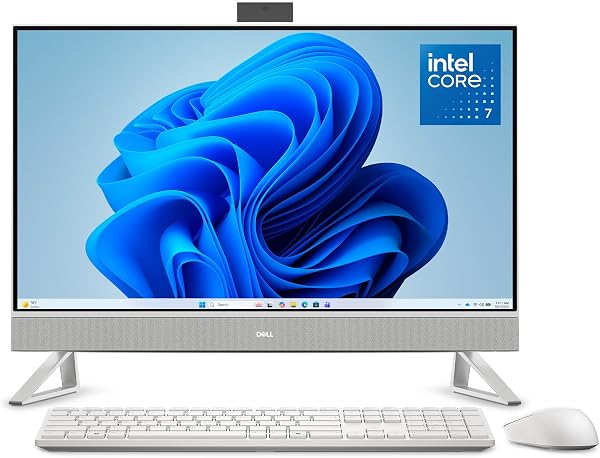
Aimed squarely at creative professionals, financial analysts, software developers, and executive home offices, this 27-inch powerhouse represents the performance pinnacle of the all-in-one category. It combines an expansive high-color display with workstation-grade memory capacity, ensuring that heavy computational workloads never falter.
We may earn a commission when you buy through this link, at no additional cost to you.
The computer is powered by an Intel Core 7 150U processor paired with an extraordinary 32GB of system RAM. This massive memory headroom allows users to compile large codebases, manipulate high-resolution images, and maintain dozens of complex spreadsheets and virtual workspaces without experiencing a hint of slowdown. Dell ComfortView Plus reduces blue-light strain while a 66% higher refresh rate delivers buttery-smooth window navigation.
Ergonomics and audio-visual engineering are top-tier. An innovative base stand provides dedicated storage space underneath the display to tuck your keyboard away when the workday finishes. The 5MP infrared pop-up camera features HDR balancing and 0 to 20 degrees of tilt, retracting cleanly into the bezel for total privacy. Integrated dual speakers support Dolby Atmos spatial audio and can even operate as standalone Bluetooth speakers for mobile devices.
The thoughtful architectural stand lets you slide your keyboard directly beneath the display when not typing, freeing up valuable desk space for paperwork. Furthermore, the high-fidelity Dolby Atmos speakers can connect via Bluetooth to your phone or tablet, doubling as a room speaker even when the PC is idle.
The premium price point reflects its high-end specifications, making it overkill for basic household browsing. However, for professionals and ambitious creators who refuse to compromise on multitasking headroom, screen quality, or manufacturer warranty support, this Dell all-in-one is an exceptional investment.
Budget-focused shoppers with modest computing needs such as basic email and web browsing.
We may earn a commission when you buy through this link, at no additional cost to you.
Built for corporate workstations, administrative departments, legal offices, and remote business staff, this 23.8-inch all-in-one desktop balances enterprise security features with a clean, attractive aesthetic. It is engineered to handle long daily shifts of spreadsheet entry, client database management, and virtual collaboration without cluttering the workplace.
We may earn a commission when you buy through this link, at no additional cost to you.
Under the hood, an Intel N100 quad-core processor operates up to 3.40GHz, paired with an upgraded 16GB of system memory and a responsive 256GB solid-state drive. This configuration delivers snappy application startup and fluid multitasking across office suites. The machine comes pre-loaded with Windows 11 Pro, supplying essential business tools such as BitLocker drive encryption and Remote Desktop access right out of the carton.
The 23.8-inch Full HD IPS anti-glare display provides 250 nits of brightness and 99% sRGB color gamut coverage, ensuring documents and digital assets appear clear and color-accurate without harsh reflections. Port selection is well planned, featuring two high-speed 10Gbps USB 3.2 Gen 2 ports for rapid data transfers, standard USB 2.0 ports for accessories, HDMI output, gigabit Ethernet, and reliable Wi-Fi 6 wireless networking.
The 99% sRGB anti-glare IPS screen effectively diffuses bright fluorescent office lighting, eliminating eye fatigue during intensive spreadsheet review. Equipped with high-speed 10Gbps USB ports and an included wireless keyboard and mouse, setting up a neat, professional workstation takes just minutes.
While demanding creative video editors will need dedicated graphics processing, this desktop handles daily business operations with quiet efficiency. For enterprise managers and independent professionals seeking an affordable, secure Windows 11 Pro desktop with excellent screen clarity, this Lenovo workstation is a very dependable choice.
Users needing extensive local storage for uncompressed video or heavy gaming workloads.
We may earn a commission when you buy through this link, at no additional cost to you.
All-in-one computers offer a unique combination of display quality, acoustic performance, and desk decluttering. Selecting the ideal model requires understanding how screen sizing, processing architectures, memory bandwidth, conferencing hardware, and storage configurations match your daily workflow requirements.
The display of an all-in-one computer is both its primary user interface and the physical chassis housing its internal components. Because you cannot simply swap out the monitor while keeping the computer, selecting the right screen size and panel technology is the most consequential decision you will make. Screen sizes generally fall into three distinct categories: ultra-compact 21.5-inch panels, standard 24-inch screens, and expansive 27-inch displays. A 21.5-inch panel fits neatly on tight student desks, narrow kitchen counters, or point-of-sale stations, while 24-inch displays offer the classic sweet spot for standard home offices, providing comfortable multitasking without overwhelming desk surface area. In contrast, 27-inch displays like the HP OmniStudio 27 or Dell 27 deliver an expansive digital canvas that lets you place two full-sized documents side by side with room to spare.
Beyond sheer physical dimensions, panel quality and color reproduction directly influence eye comfort and work precision. Look for In-Plane Switching (IPS) panels, which provide wide 178-degree viewing angles and consistent color representation even when viewed from off-center angles. Panels featuring 99% sRGB color gamut coverage, such as those found on Dell all-in-one systems, ensure that web graphics, digital photographs, and streaming media look true to life. Furthermore, hardware-level blue-light reduction technologies like HP Eye Ease and Dell ComfortView Plus reduce eye strain during prolonged screen sessions without introducing the unnatural yellow tint associated with cheap software filters. Anti-glare matte coatings are equally vital if your computer faces a bright window or sits under direct overhead office lighting.
Choose a 24-inch IPS display with blue-light filtering for balanced everyday home office tasks, step up to an expansive 27-inch screen if you routinely multitask with side-by-side windows, and reserve 21.5-inch models for compact spaces where desk real estate is at a premium.
The central processing unit dictates how quickly applications open, how smoothly complex spreadsheets calculate, and how well your system handles background tasks during video conferences. Today’s all-in-one market features a spectrum of processing architectures, ranging from high-efficiency quad-core chips to multi-core hybrid platforms with dedicated artificial intelligence coprocessors. Entry-level chips such as the Intel N100 and N150 utilize energy-efficient microarchitectures with four cores and four threads, running at lower thermal design power. These processors excel at standard web browsing, office document editing, video streaming, and online classroom portals, producing very little heat and allowing fanless or whisper-quiet cooling systems to maintain steady operation.
When daily productivity expands into intensive data analysis, creative photo editing, or multitasking across dozen-tab browser sessions, modern mid-tier and high-tier processors become necessary. The AMD Ryzen AI 7 445 and Intel Core 7 150U incorporate higher core counts and hybrid performance architectures that intelligently distribute computational threads. Crucially, newer processors like the AMD Ryzen AI series integrate a dedicated Neural Processing Unit (NPU). This specialized AI hardware handles tasks like real-time background blur, microphone noise cancellation, and automated productivity assistance without consuming primary CPU cycles, ensuring that your system remains responsive even during intensive video calls.
Opt for an energy-efficient quad-core processor if your computing routine centers on administrative tasks, homework, and web browsing, but invest in an Intel Core or AMD Ryzen AI processor if you intend to run intensive business applications, photo suites, or frequent AI-assisted video conferences.
System memory determines your computer’s ability to maintain multiple active programs, browser windows, and background processes without stuttering or freezing. In all-in-one systems, where physical RAM upgrades can be difficult due to integrated chassis designs, choosing the proper memory capacity at purchase is essential for long-term satisfaction. Modern all-in-ones primarily use DDR5 memory, which offers higher data bandwidth and lower operating voltages than older DDR4 standards, allowing information to transfer between the memory bus and the processor at significantly faster speeds.
An 8GB memory configuration serves as the functional entry point for modern computing, adequate for general web browsing, basic document drafting, and light media streaming. However, modern web browsers and productivity suites are notoriously memory-hungry; keeping dozens of tabs open while running video meetings can quickly exhaust 8GB of RAM, forcing the operating system to swap data to the SSD and causing momentary delays. Upgrading to 16GB of RAM provides comfortable headroom for fluid multitasking, allowing you to run video conferencing, office suites, and creative tools simultaneously. For power users, software developers, and financial analysts managing dense models, a 32GB configuration, as seen in the Dell 27 All-in-One, ensures completely lag-free performance under heavy professional workloads.
Select 16GB of DDR5 RAM as the ideal standard for smooth, future-proof everyday productivity, while reserving 8GB for budget-conscious, single-task setups and stepping up to 32GB only for demanding professional workflows.
Storage speed directly governs system boot times, software launch speeds, and file transfer rates, while capacity determines how much software and local media your desktop can accommodate. Contemporary all-in-one desktops rely on solid-state drives, having completely phased out noisy, fragile mechanical hard drives. High-speed PCIe NVMe M.2 solid-state drives deliver read and write speeds measured in thousands of megabytes per second, allowing Windows 11 to boot in seconds and complex business programs to open almost instantaneously.
Capacity requirements vary significantly depending on how you manage your files. Compact or budget-focused models often feature 128GB of internal flash or SSD storage, which is sufficient for the operating system and basic productivity apps but leaves limited room for extensive photo archives or video files. Some manufacturers address this by offering hybrid storage bundles, such as the HP 21.5 with an included docking station card or the HP OmniStudio 24 with a bundled 500GB external flash drive, providing combined capacities exceeding 600GB. For maximum convenience without external dongles, systems equipped with a native 512GB or 1TB PCIe SSD, such as the Lenovo IdeaCentre AIO, provide seamless local storage for thousands of high-resolution images, video files, and project archives.
Target a native 512GB PCIe NVMe SSD for a clean, hassle-free experience, or choose a 1TB drive if you keep large offline media libraries; if opting for a 128GB model, factor in cloud storage subscriptions or external drive solutions from day one.
One of the greatest practical advantages of an all-in-one desktop is the integration of video conferencing hardware directly into the screen bezel, eliminating the need for awkward third-party webcams perched atop monitors. However, webcam quality varies considerably across models, ranging from basic 720p sensors to advanced 5-megapixel infrared cameras. A high-resolution 1080p or 5MP sensor delivers noticeably sharper video, better low-light performance, and more natural skin tones during virtual meetings, which is crucial for remote professionals presenting to clients and colleagues.
Audio capture and visual privacy are equally critical aspects of the conferencing ecosystem. Look for dual-array microphone configurations that utilize beamforming and artificial intelligence noise suppression to isolate your voice while filtering out household noises such as barking dogs, typing, and background conversation. Privacy mechanisms are another major consideration: many modern all-in-one models feature retractable pop-up camera modules that physically push down into the chassis when not in use, while others incorporate sliding physical shutters over the lens. These physical barriers provide guaranteed visual security that cannot be compromised by software glitches or unauthorized access.
Prioritize all-in-one computers with at least a 1080p or 5MP webcam, AI-assisted microphone noise cancellation, and a physical pop-up or shutter mechanism if you regularly participate in video meetings for business or education.
Unlike standard PC monitors, which typically feature quiet, tinny speakers as an afterthought, all-in-one computers frequently incorporate dedicated stereo acoustic chambers tuned by renowned audio brands. Systems featuring DTS Sound Unbound or Harman audio engineering deliver rich, directional sound with clear vocal clarity and balanced low-end response, making external desktop speakers entirely unnecessary. High-end models like the Dell 27 even feature dual Bluetooth speaker functionality, allowing you to stream music from your smartphone through the computer’s sound system even when you are not actively using the PC.
Ergonomics and physical cable management complete the all-in-one advantage. Because the computer, screen, speakers, and webcam share a single enclosure, the entire workstation requires only a single power cord to operate. Look for models with thoughtful stand ergonomics, such as tilt adjustment from -5 to 20 degrees, which allows users to match the display angle to their eye level. Innovative designs, such as the Dell stand with dedicated keyboard storage space underneath the panel, allow you to slide input devices completely out of the way when reviewing physical documents, maximizing usable desk space.
Evaluate the built-in speaker capabilities and stand tilt range before purchasing, ensuring the system delivers clear, room-filling sound and comfortable viewing angles while maintaining the clean, single-cord aesthetic that defines the category.
To set up your all-in-one computer for optimal ergonomics and performance, place the unit on a sturdy, level desk away from direct sunlight and heat sources. Adjust the screen tilt so that the top third of the display aligns horizontally with your resting eye level, which helps prevent neck and shoulder strain during long work sessions. Ensure that the cooling intake vents along the bottom edge and exhaust grilles along the top or rear have at least three inches of unobstructed clearance to promote steady airflow. Connect the main power adapter to a high-quality surge protector rather than directly into an unshielded wall socket to guard sensitive display and compute components against power surges.
Maintaining the display surface requires gentle, deliberate care to preserve its specialized anti-glare and blue-light filtration coatings. Always power off the machine and unplug the power cable before cleaning the screen. Use a dry, clean microfiber cloth to gently wipe away dust and fingerprints using light circular motions. Never spray household glass cleaners, ammonia, acetone, or alcohol-based solutions directly onto the display panel, as these chemicals can degrade protective optical layers. If stubborn smudges persist, lightly dampen the microfiber cloth with distilled water or a dedicated screen-cleaning solution, wiping gently and allowing the panel to air dry completely before restoring power.
Preserve the speed and thermal efficiency of your all-in-one through regular software maintenance and gentle physical cleaning. Every few months, inspect the ventilation slots for accumulated airborne dust, clearing them with brief, gentle bursts of compressed air while holding the can upright. Within Windows 11, review your startup applications via Task Manager to disable unnecessary background programs that slow down boot times. Keep Windows Update and hardware drivers current to maintain security patches and stability, and avoid placing bulky objects directly beneath the bottom speakers or camera modules to preserve optimal acoustic projection and smooth mechanical pop-up operation.
An all-in-one computer integrates the computer processor, motherboard, memory, storage, speakers, and webcam directly into the monitor enclosure. Unlike traditional desktop computers, which require a separate floor tower, external display cables, and freestanding speakers, an all-in-one operates as a self-contained unit powered by a single wall cable. This design saves desk space, eliminates cable clutter, and provides an elegant, streamlined workspace.
Due to their integrated, space-efficient design, all-in-one computers offer limited hardware upgradability compared to traditional desktop towers. The display panel, motherboard, and processor are permanently integrated into the chassis and cannot be swapped out later. However, depending on the specific model, some systems allow upgrades to memory (RAM) and solid-state storage, while peripheral connectivity via USB-C and docking hubs makes external expansion straightforward.
The ideal screen size depends primarily on your desk dimensions and daily multitasking habits. A 23.8-inch or 24-inch model is widely considered the standard sweet spot, providing ample viewing area for documents and video meetings without dominating smaller desks. A 27-inch model offers significantly more screen real estate, making it superior for viewing two full-sized applications side by side, though it requires a deeper desk to view comfortably.
For basic document drafting, light streaming, and everyday web browsing, 8GB of DDR5 RAM provides adequate performance. However, 16GB has become the recommended standard for comfortable multitasking, allowing you to keep dozens of browser tabs open while attending video calls without experiencing system lag. Power users working with massive spreadsheets, local databases, or creative photo suites will benefit from 32GB of memory.
All-in-one computers are exceptionally well-suited for video meetings because they integrate webcams, stereo microphones, and audio speakers directly into the screen bezel. Many models feature high-resolution 1080p or 5MP cameras, AI-assisted background noise reduction, and physical pop-up privacy shutters. This built-in hardware provides clear video and crisp audio without requiring external webcams, microphones, or headphone cables.
Fanless all-in-one computers utilize highly efficient, low-power processors that dissipate heat passively through internal heatsinks rather than mechanical cooling fans. This architecture allows the computer to operate in complete silence, which is ideal for quiet bedrooms, study areas, and shared living spaces. Fanless systems also draw significantly less dust into the chassis, extending hardware longevity.
Using an all-in-one as an external display depends on whether the unit includes a dedicated HDMI-in port. While most all-in-one computers feature an HDMI-out port to drive an external second screen, only select models include an HDMI-in port that accepts video signals from game consoles or laptops. Always check the port specifications if you intend to use the display as a secondary monitor.
Windows 11 Home provides all the essential entertainment, web, and productivity tools needed for personal and family use. Windows 11 Pro adds enterprise-level management and security features, including BitLocker device encryption to protect sensitive data and built-in Remote Desktop host capabilities. Small businesses, commercial workstations, and remote corporate employees typically require Windows 11 Pro for network domain integration.
To clean an all-in-one screen safely, power down the computer and gently wipe the panel using a clean, dry microfiber cloth. Avoid using paper towels, which can cause micro-scratches, and never use harsh household glass cleaners containing ammonia, bleach, or alcohol. For persistent smudges, lightly dampen the microfiber cloth with distilled water or an electronics-safe screen cleaner before wiping gently in circular motions.
For users seeking the ultimate blend of expansive visual real estate, modern artificial intelligence processing, and premium multimedia integration, the HP OmniStudio 27 AI stands out as the most capable overall option. Its AMD Ryzen AI processor, generous 27-inch canvas, HDR auto-switching camera, and immersive spatial audio make it an exceptional anchor for demanding home offices and creative workflows.
Buyers with distinct workspace constraints or budget requirements also have outstanding alternatives available. The Lenovo IdeaCentre AIO delivers remarkable value by pairing a generous 1TB solid-state drive with Harman-tuned audio, while the Dell 27 All-in-One caters to high-end multitasking with its massive 32GB RAM capacity. For compact desks and quiet study environments, the fanless HP OmniStudio 24 and modular HP 21.5 Docking AIO offer completely silent operation and minimal physical footprints.
To select the perfect all-in-one desktop, evaluate your available desk dimensions against your daily multitasking demands. Choosing a system with the right balance of screen fidelity, memory headroom, and integrated conferencing hardware ensures you enjoy a clean, clutter-free workstation that remains productive and dependable for years to come.