SecuLife Alert Pendant
7.6Editor scoreAuto fall detection
Real-time GPS tracking
6-day battery life
IP67 waterproof rated
Compare 10 top medical alert systems for seniors with fall detection, GPS tracking, no monthly fees, and in-home or mobile coverage options.
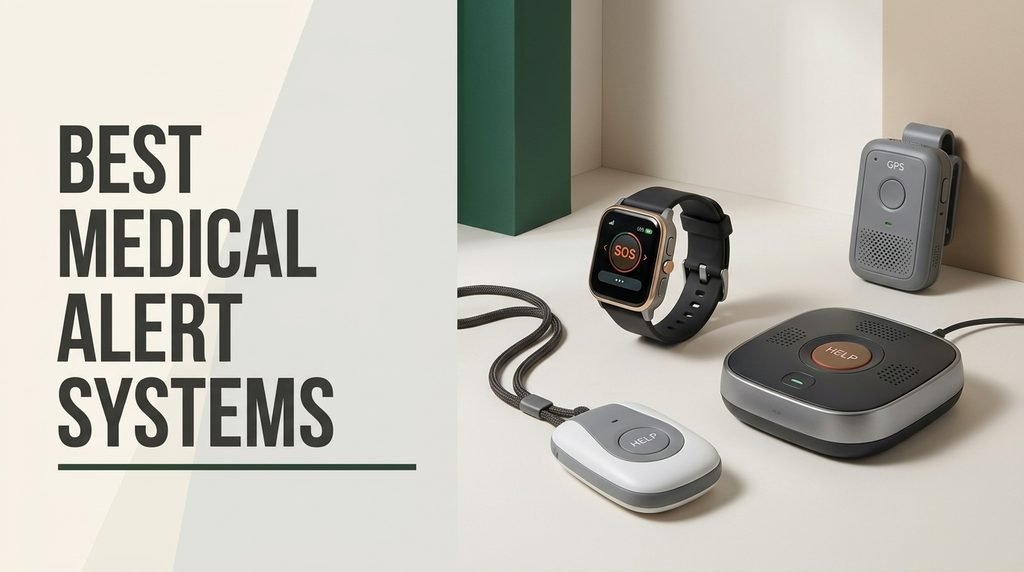
Choose the right medical alert systems for 2026 with confidence. We compare 10 standout options across the factors that matter most for senior safety: connectivity type, fall detection, GPS tracking, battery life, range, subscription requirements, water resistance, wearing options, two-way voice, and overall value for different living situations and mobility levels.
Medical alert devices vary more than most families realize. Some use cellular networks for anywhere coverage, others rely on home WiFi or landline connections. Fall detection, GPS, and 24/7 monitoring add important capabilities but often require monthly fees. Understanding which features your loved one actually needs prevents overspending or under-protecting.
This guide walks through in-home pagers for caregivers, GPS-equipped mobile pendants for active seniors, and professional monitoring systems backed by response centers. Each review highlights who the device fits best, what the ongoing costs look like, and where it falls short so your choice reflects real needs rather than marketing language.
We compared 10 medical alert systems using the details that actually help families decide: connectivity type including cellular WiFi and landline, fall detection capability, GPS tracking accuracy, battery life between charges, wireless range, waterproof rating, wearing options like pendant or wristband, two-way voice communication, subscription requirements and monthly costs, response time, owner feedback, and value. The notes focus on practical trade-offs so each pick matches how seniors actually live at home, travel, and summon help when it matters most.


Compare key features, scores, and current prices side by side. A shorter feature list means fewer details were available, not necessarily fewer capabilities.






This system takes a modern approach to in-home alert by combining a traditional call button and receiver setup with WiFi connectivity that pushes alerts to a smartphone app. For families who want to monitor an aging parent remotely without paying monthly subscription fees, this hybrid approach fills a genuine gap in the market.
We may earn a commission when you buy through this link, at no additional cost to you.
The dual-channel reliability is a thoughtful design choice. The system uses both WiFi and a dedicated wireless signal, so if your home internet goes down, the local pager still functions through its 300-foot wireless range. When WiFi is working, caregivers also receive push notifications on their phones through the Tuya Smart or Smart Life apps, which is particularly useful for adult children who do not live with their parent.
The waterproof wristband is practical because many falls happen in bathrooms during showering, exactly when a non-waterproof button would be useless. The LED number display on the receiver identifies which button was pressed, so caregivers in multi-resident settings like nursing homes can quickly identify who needs help. Device sharing through the app lets multiple family members receive alerts simultaneously.
Internet outages are more common than people realize, and a WiFi-only alert device becomes useless when the connection drops. Dual-channel designs that pair WiFi with a dedicated wireless signal keep the local pager working even during outages, while still offering smartphone notifications when the internet is available. This redundancy is especially important for medical alert devices, where reliability can determine health outcomes.
This system suits families who want remote notification capabilities without a monthly contract and who have reliable 2.4GHz WiFi at home. It is not designed for seniors who leave the house frequently, since the range is limited to home coverage. For a GPS-enabled mobile system, look at the SecuLife or Bay Alarm options instead.
Seniors who leave the house frequently or need GPS tracking for outdoor emergencies.
We may earn a commission when you buy through this link, at no additional cost to you.
The SecuLife pendant takes a different approach from traditional medical alert systems by sending alerts directly to family contacts rather than routing through a call center. For families who want to be the first responders and prefer avoiding the delays and limitations of third-party dispatchers, this direct-to-family model offers meaningful advantages in response speed.
We may earn a commission when you buy through this link, at no additional cost to you.
The automatic fall detection is the standout feature, instantly calling and sending SOS notifications to preselected contacts when a fall is detected. Real-time GPS tracking with custom geofence zones alerts family when the wearer enters or leaves designated areas, which is particularly valuable for seniors with dementia or memory concerns. The pendant includes two-way calling with hands-free auto-answer for genuine phone-like communication.
The IP67 waterproof rating means the device can be worn around the clock including in the shower, which eliminates the common problem of seniors removing their alert device during the exact activity when falls happen most. Battery life of up to 6 days with 24-hour interval tracking reduces charging frequency significantly compared to devices that need daily charging.
Traditional medical alert systems route emergency calls through a monitoring center where operators assess the situation and dispatch help. Direct-to-family models skip the intermediary and connect straight to designated family contacts. Each approach has merits: call centers provide trained professional response around the clock, while direct family alerts eliminate response delays and let loved ones make personal judgments about the situation.
This pendant suits families who want 24/7 protection, GPS tracking, and fall detection in a single wearable, and who accept the $20 monthly subscription for unlimited fall alerts, tracking, voice minutes, and customer care. The lower product rating suggests some variability in experiences, so verify the return policy before buying. If you prefer no monthly fees and only need home coverage, consider the No-Fee Alert System instead.
Buyers who want to avoid monthly subscription costs or need professional 24/7 call center monitoring.
We may earn a commission when you buy through this link, at no additional cost to you.
The Freedom Alert system targets seniors who maintain traditional landline phone service and want direct emergency communication without ongoing fees. For households that still have a landline, this device leverages existing infrastructure to provide reliable emergency communication at a predictable one-time cost.
We may earn a commission when you buy through this link, at no additional cost to you.
The two-way voice communication pendant lets the wearer have a full conversation with either 911 dispatchers or family members directly from the pendant. This is a significant advantage over simple panic buttons that only transmit an alarm without allowing the user to describe the situation. First responders can assess the emergency and dispatch appropriate help based on what they hear.
The absence of monthly fees is a genuine differentiator. Many competing systems charge $30 to $45 per month in perpetuity, which adds up to thousands of dollars over the typical use period. This device requires only the upfront purchase and the existing landline service. The rechargeable design with 24-hour battery backup eliminates battery replacement hassles and provides protection during power outages.
Landline alert systems offer excellent reliability during power outages when combined with battery backup, and they avoid monthly fees by using the existing phone line. The main limitation is that many homes have discontinued landline service in favor of cellular or VoIP. If you have landline service, these systems provide excellent value. If you do not, cellular alternatives are necessary even with their monthly subscription costs.
This system suits seniors who still have active landline service and want independence from monthly subscriptions. The $299 upfront cost pays for itself quickly compared to subscription services. If your home has already converted to cellular-only or VoIP service, this device cannot connect to those networks and you should consider a cellular-based option like the Bay Alarm or Medical Guardian MGMini instead.
Households without active landline phone service or seniors who want mobile GPS coverage.
We may earn a commission when you buy through this link, at no additional cost to you.
This caregiver pager represents the entry-level approach to medical alert: a simple call button paired with a receiver that alerts someone within range. For situations where a caregiver, spouse, or family member is present in the home, this straightforward design handles most common needs at a fraction of the cost of monitored systems.
We may earn a commission when you buy through this link, at no additional cost to you.
The 1500-foot wireless transmission range is generous for an in-home device, easily covering most homes including multi-story layouts. The system is expandable to 30 call buttons and multiple receivers, which makes it suitable not just for single-caregiver situations but also for small nursing homes, assisted living facilities, or multi-family homes with several seniors.
The receiver offers 58 ringtones and 5 volume levels up to 120 decibels, loud enough to wake sound sleepers or alert caregivers in other rooms. The IP55 waterproof and dustproof rating lets the call button work in bathrooms, outdoor patios, and other wet environments. The 18-month warranty signals genuine confidence in the product and provides reasonable buyer protection.
Not every senior needs GPS tracking and 24/7 monitoring. If an adult child, spouse, or hired caregiver is present in the home most of the time, a wireless pager handles the practical need of summoning that person to the senior’s side without requiring expensive monitoring services. Match the system to the actual care situation rather than defaulting to the most feature-rich option.
This system makes the most sense when a caregiver is already present in the home and simply needs to know when the elderly person needs assistance. It is not a substitute for a monitored system when no one is nearby. For independent seniors who live alone, a system with GPS and either call center or family notification like the SecuLife or Bay Alarm would be more appropriate.
Seniors who live alone or need protection when no caregiver is in the home.
We may earn a commission when you buy through this link, at no additional cost to you.
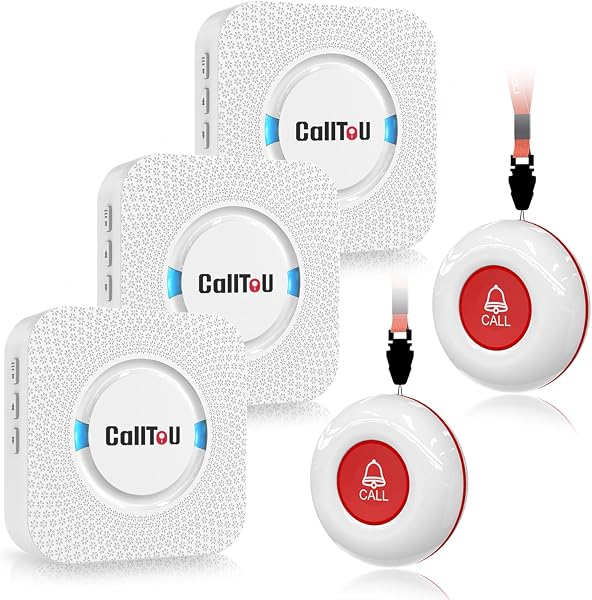
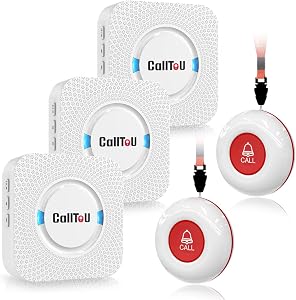
The CallToU kit addresses households where a single receiver cannot cover every room where a caregiver might be. With three receivers and two call buttons included in the base package, this system places receivers in the kitchen, bedroom, and living area simultaneously so caregivers hear alerts no matter where they are in the home.
We may earn a commission when you buy through this link, at no additional cost to you.
The 500-foot open-area range is sufficient for most homes, and the receivers plug into standard electrical outlets rather than requiring battery changes. The call buttons can be worn around the neck with the included strap, mounted with the bracket, or affixed with double-sided tape in strategic locations like the bathroom or bedside. This flexibility accommodates different user preferences and mobility levels.
The receiver offers 55 ringtone options with 5 volume levels up to 110 decibels, loud enough to be heard clearly in most situations. Both the call button and receiver are waterproof and dustproof, making the system reliable in bathrooms, kitchens, and outdoor areas. The two-button package also makes it practical for a senior to keep one at the bedside and wear the other during the day.
A single receiver creates a dead zone whenever the caregiver is out of hearing range. Multiple receivers distributed throughout the home eliminate these blind spots and ensure alerts are heard whether the caregiver is cooking, resting, or watching television in a different room. For larger homes or households with hearing concerns, the multi-receiver approach significantly improves alert reliability.
This kit suits households with multiple caregivers who move between rooms, or situations where the receiver needs to be audible across a larger home. The receivers’ need for outlet power is a minor limitation that affects placement options. For households with a single caregiver in close proximity, the simpler one-button pager offers similar functionality at lower cost.
Small apartments or households where a single receiver can cover all caregiver areas.
We may earn a commission when you buy through this link, at no additional cost to you.
This system solves a specific problem elegantly: it provides automatic phone dialing to family members with a personalized emergency message, without any monthly fees. For seniors who live alone and want their adult children or neighbors notified automatically during emergencies, this delivers that capability through a one-time purchase.
We may earn a commission when you buy through this link, at no additional cost to you.
The 70,000 square foot coverage area is dramatically larger than typical home pagers, easily handling even very large homes, properties with detached buildings, or apartment buildings where the senior may be visiting different units. The base unit sequentially calls up to 3 phone numbers and plays a customized emergency message, continuing through the list until someone answers.
The package includes both a necklace-style button and a wrist-worn button, giving the user options for how they prefer to wear the device. The waterproof design means both can be worn in the shower and during daily activities without concern. Up to 8 total panic buttons can be added in any combination of wrist or necklace styles, making the system expandable for multi-user households.
A simple pager requires a caregiver to be nearby to respond. An automatic dialer calls designated family members or neighbors who may be miles away, which is critical for seniors who live alone. The ability to call multiple numbers in sequence until someone answers ensures that help is actually reached rather than just signaled. For seniors without live-in caregivers, this capability is often more important than the lowest price.
This system suits seniors who want automated family notification without ongoing fees and whose homes have active phone service to make the automated calls. The one-time cost compares favorably to years of subscription payments on competing systems. If you need GPS tracking for away-from-home protection or professional call center monitoring, consider the Bay Alarm Mobile GPS or Medical Guardian MGMini instead.
Seniors who need away-from-home GPS coverage or professional emergency monitoring services.
We may earn a commission when you buy through this link, at no additional cost to you.
The FullHouse pager stands out for its LED-only silent mode, which solves a common problem in households with light sleepers, young children, or shared living situations. Caregivers can keep the receiver near them without worrying about audio alerts waking others, since the LED flash provides visual notification without sound.
We may earn a commission when you buy through this link, at no additional cost to you.
The 1000-foot open-air range covers most homes including multi-story layouts, with 500 feet of range through typical walls. The receiver can be plugged in at the caregiver’s current location and moved around the home as needed. The call button can be placed in a pocket, attached to a wheelchair, mounted bedside, or worn as a necklace, which accommodates different care situations and user preferences.
With 52 melodies to choose from and 5 volume levels up to 110 decibels, caregivers can match the alert to their environment and hearing needs. The call button is splash-proof but not fully submersible, so it should be removed before showers or baths. This is a meaningful limitation compared to fully waterproof alternatives, since many falls happen during bathing.
Loud ringtones work for most alert situations but fail in households where other family members are sleeping or where quiet is important. LED-only silent modes let caregivers monitor for alerts without disturbing others, which is particularly valuable at night or in households with young children. The ability to switch between audible and silent modes based on the time of day adds flexibility.
This pager fits households with sleeping or sensitive family members where silent alerts matter, and situations where the caregiver is on-site but needs to move around a large home. If bathroom protection is a priority, consider the fully waterproof Life Alert WiFi System or SecuLife Pendant instead.
Seniors who need waterproof protection during showers or who require away-from-home coverage.
We may earn a commission when you buy through this link, at no additional cost to you.
The Nomo Smart Care Kit takes a smart-home approach to senior safety by combining a central hub with range-extending satellites and wearable tags. The system covers larger homes more thoroughly than single-point alert devices, with the hub providing two-way voice communication and the satellites ensuring the wearable tags maintain connection throughout the house.
We may earn a commission when you buy through this link, at no additional cost to you.
Setup is designed to be straightforward: plug the hub and satellites into wall outlets and place or wear the tags without special wiring or technician visits. The wearable tags detect falls and emergency button presses, sending instant alerts to the designated Care Circle through the Nomo app. This modern approach feels more like a smart home system than a traditional medical alert.
The included 30-day trial of 24/7 monitoring through RapidSOS emergency services provides professional response during the trial period, after which a monthly subscription applies. This try-before-you-commit approach is more buyer-friendly than systems that lock in subscriptions from day one. The care circle feature keeps family members informed through the app without requiring professional monitoring if that is the preference.
Smart home alert systems offer deeper integration with modern technology including app-based monitoring, multiple device coordination, and cloud-based features. The trade-off is complexity: these systems require WiFi, app installation, and some technical comfort to set up and maintain. Traditional alert pagers or cellular pendants work more simply but offer fewer integration features. Match the technology to the user and family’s technical comfort level.
This system suits tech-comfortable families who want modern smart home integration and whose homes have reliable WiFi. The multi-point coverage handles larger homes better than single-receiver systems. Families who prefer simpler technology or do not want to deal with WiFi configuration may find traditional pagers or cellular pendants easier to use.
Non-technical families or households without reliable WiFi infrastructure.
We may earn a commission when you buy through this link, at no additional cost to you.
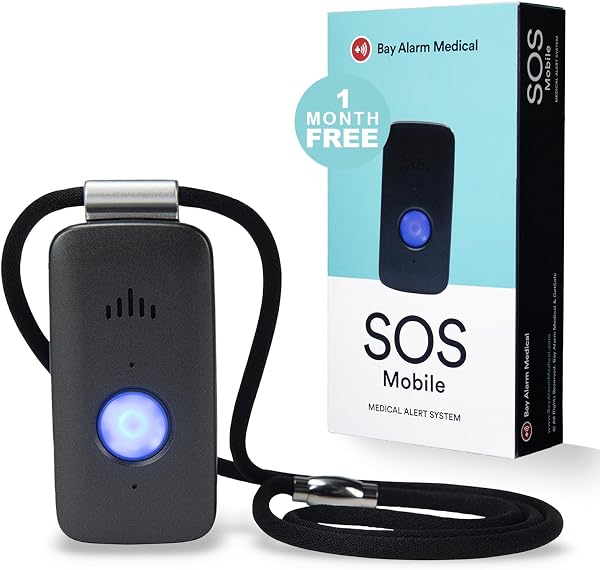
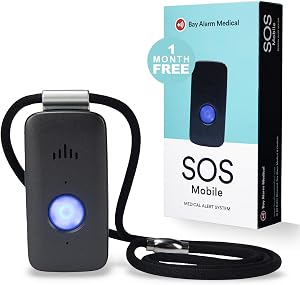
The Bay Alarm Medical SOS Mobile GPS targets seniors who maintain active lifestyles outside the home. The 4G LTE cellular connectivity provides nationwide coverage, which means the device works anywhere there is cellular service rather than being tied to a home base station. For seniors who travel, run errands, or spend time outside, this mobility is essential.
We may earn a commission when you buy through this link, at no additional cost to you.
At under 2 ounces, the device is light enough to wear comfortably as a necklace or clip to clothing without becoming burdensome. The one-button access connects directly to a trained operator through the built-in two-way speaker, allowing voice communication rather than just a silent alert. The water-resistant protection handles rain and splashes though it is not fully waterproof like IP67-rated devices.
The companion mobile app lets caregivers monitor device status, battery level, and activity, which keeps family members informed without constant check-in calls. The standalone design means the device works independently without requiring a smartphone connection or home internet. Multi-day battery life depends on usage patterns but reduces the burden of daily charging.
Most falls happen at home, but many serious medical emergencies occur during outside activities like gardening, walking, shopping, or driving. Mobile GPS medical alerts cover these away-from-home situations where traditional in-home systems provide no protection. For active seniors who maintain independent lifestyles, mobile coverage can be the difference between quick help and dangerous delays.
This system suits active seniors who leave the home regularly and need protection beyond the four walls. The required subscription is standard for monitored cellular systems, with optional fall detection available as an add-on. For home-only use, less expensive non-cellular options like the No-Fee Alert System or caregiver pagers would be more cost-effective.
Homebound seniors who rarely leave the house and want to avoid monthly subscription costs.
We may earn a commission when you buy through this link, at no additional cost to you.
The Medical Guardian MGMini brings an established brand's professional 24/7 monitoring to a device designed to look more like modern jewelry than medical equipment. The rose gold finish and compact form factor address a real concern: many seniors resist wearing obvious medical alert pendants because they feel stigmatizing. A discreet design increases the likelihood of consistent use.
We may earn a commission when you buy through this link, at no additional cost to you.
Pressing the emergency button connects to Medical Guardian’s U.S.-based 24/7 monitoring team through the device’s two-way speaker. Trained operators then contact EMS, family, or friends based on the specific situation. This professional response capability is a significant upgrade over systems that only notify family members, since operators can dispatch appropriate help even when family cannot be reached immediately.
The included lanyards and belt clip offer wearing flexibility, and the companion online portal and app provide hourly location updates and step counting for family members. The 3-day battery life with 4-hour recharge is reasonable for daily use with regular charging habits. Medical Guardian’s history serving over 630,000 members provides reassurance about company stability and service reliability.
Medical equipment that looks like medical equipment often ends up in a drawer rather than on the person it is meant to protect. Discreet designs that resemble jewelry or everyday wearables increase the likelihood of consistent use, which directly affects how often the device is available when an emergency occurs. For seniors concerned about appearing frail or needing help, aesthetic considerations are not vanity but a legitimate safety factor.
This device suits seniors and families who value professional monitoring and want a discreet design that encourages consistent wear. The $43.95 monthly subscription after the trial month is comparable to industry pricing for monitored services, with optional fall detection available for an additional $10 per month. For buyers wanting to avoid subscriptions entirely, the No-Fee Alert System or Freedom Alert Landline options cover that need differently.
Buyers unwilling to pay recurring monthly subscription fees for professional monitoring.
We may earn a commission when you buy through this link, at no additional cost to you.
Medical alert devices range from simple caregiver pagers to full cellular systems with professional monitoring. The right choice depends on where the senior lives, how often they leave the home, who provides care, and whether ongoing subscription fees fit the budget. Use the factors below to narrow down which combination fits the real situation.
Medical alert systems connect to the outside world in three main ways. Cellular systems like the Bay Alarm Mobile GPS use 4G LTE networks for nationwide coverage, which lets the device work anywhere there is cellular service. WiFi systems like the Life Alert WiFi System and Nomo Smart Care Kit rely on home internet, which works well for in-home protection but fails if the WiFi goes down. Landline systems like the Freedom Alert use traditional phone service for highly reliable in-home communication without ongoing fees.
Each connection type has distinct advantages and limitations. Cellular systems travel with the senior but require ongoing subscription fees. WiFi systems may offer no-fee options but depend on reliable home internet. Landline systems are reliable and often fee-free but require active landline service, which many households no longer maintain. The best choice matches the senior’s actual living situation and connectivity infrastructure.
Choose cellular for active seniors who leave the house, WiFi for home-based protection with smart features, and landline for traditional reliability without ongoing fees. Verify your home’s connectivity before purchasing.
Automatic fall detection uses sensors to recognize when the wearer has fallen and triggers an alert without requiring the user to press a button. This is critical because many fall victims are unable to press a button due to unconsciousness, confusion, or injury. The SecuLife Alert Pendant and Nomo Smart Care Kit both include fall detection as a built-in feature, while the Medical Guardian MGMini offers it as a $10 monthly add-on.
Fall detection is not perfect and can produce false alarms from sudden sitting, dropping the device, or other movements. Modern systems have improved significantly at distinguishing real falls from everyday motion, but no system catches 100 percent of falls or avoids all false alerts. Users and families should understand this limitation rather than assuming automatic protection replaces the manual button entirely.
Prioritize fall detection for seniors with mobility issues, balance problems, or history of falls. For physically stable seniors with intact cognitive function, the manual button alone may be sufficient and keeps costs lower.
GPS-equipped medical alerts provide real-time location tracking, which is valuable for both emergency response and daily peace of mind. If a senior falls or has a medical emergency away from home, GPS lets responders find them quickly even when they cannot communicate their location. For seniors with dementia or memory concerns, geofencing features alert family when the wearer enters or leaves designated areas.
The SecuLife Pendant offers geofence zones with location history, while the Bay Alarm Mobile GPS and Medical Guardian MGMini both include GPS tracking through their monitoring services. These features typically require cellular connectivity and are not available on landline or WiFi-only home systems. For seniors who stay at home, GPS adds cost without providing proportional benefit.
Choose GPS-enabled systems for seniors who travel, drive, walk outdoors, or have memory concerns. For homebound seniors, invest the premium in other features like fall detection or professional monitoring instead.
The cost structure of medical alerts varies dramatically. Subscription services like Medical Guardian and Bay Alarm typically cost $30 to $45 per month, which can total $5,000 or more over a decade of use. One-time purchase systems like the No-Fee Alert System and Freedom Alert Landline avoid these ongoing fees but may lack features like professional monitoring, cellular connectivity, or GPS tracking.
Subscription services typically include professional monitoring where trained operators respond to alerts and dispatch help as needed. One-time purchase systems usually rely on family members or neighbors to respond to notifications. Neither approach is universally better: subscriptions provide guaranteed response at ongoing cost, while family-based systems depend on contact availability but save money long-term.
Calculate the total cost over your expected usage period and compare it to subscription alternatives. For seniors with reliable family contacts, no-fee systems often provide better long-term value. For those without strong family networks or who need guaranteed response, subscription monitoring may be worth the ongoing cost.
In-home alert systems have specific wireless ranges that determine where the call button works relative to the receiver or base station. Simple pagers like the Wireless Caregiver Pager offer up to 1500 feet of open-air range, while whole-home systems like the No-Fee Alert System provide 70,000 square feet of coverage. Mobile cellular systems like the Bay Alarm work anywhere with cellular service.
Range specifications typically assume open-air conditions and reduce significantly through walls, floors, and electromagnetic interference. A 1500-foot rated system may only cover 500 feet through typical home construction. For multi-story homes, large properties, or buildings with thick walls, choose systems with range specifications well above your actual needed coverage area.
Measure the furthest point you need coverage from the planned receiver location and choose a system with at least double that range specification. For multi-story homes, test placement options before committing to a specific receiver location.
Bathrooms are statistically the most dangerous rooms in a home for seniors, with slippery surfaces, hard fixtures, and the risk of medical events during bathing. A medical alert device that cannot be worn in the shower provides zero protection during these high-risk activities. Devices with IP67 ratings like the SecuLife Pendant are fully waterproof and can be worn continuously including during showers.
Lower water resistance ratings like IP55 handle splashes and rain but should not be submerged. The FullHouse Caregiver Pager button is splash-proof but not fully waterproof, requiring removal before bathing. This creates exactly the gap in coverage that makes bathroom protection unreliable. For seniors with mobility concerns, this limitation is a significant drawback.
Prioritize fully waterproof devices with IP67 or similar ratings for seniors at risk of bathroom falls. For caregiver pagers used in rooms where the caregiver is nearby, splash resistance may be sufficient.
Battery life affects both convenience and reliability. Devices that need daily charging often get forgotten, leaving the senior unprotected when the battery dies. Longer battery life reduces this risk significantly. The SecuLife Pendant lasts up to 6 days per charge, while the Medical Guardian MGMini offers 3 days with a quick 4-hour recharge. Simple home pagers often run for months on battery or use outlet power that never needs charging.
Charging method matters as well. Devices with dedicated charging cradles are easier for seniors with dexterity issues than those requiring plug insertion. Base stations that charge the device while sitting unused provide seamless power management. For cognitive concerns like memory loss, systems that notify caregivers of low battery through apps help prevent forgotten charging.
Match battery life to the user’s reliability. Daily-charge devices work for organized users with established routines, while longer-lasting batteries or cradle-based charging better suit seniors with memory or dexterity challenges.
The device that gets worn is the one that provides protection. Pendant necklaces work well for seniors who find wrist devices uncomfortable, while wristbands stay out of the way during activities but may be forgotten when the user removes jewelry at bedtime. Many systems offer multiple wearing options, letting the user choose their preference or alternate between styles.
Discreet designs like the rose gold Medical Guardian MGMini address the stigma that some seniors associate with obvious medical alert pendants. If a senior refuses to wear an obvious medical device, the technology is useless regardless of its specifications. Consider the user’s style preferences and willingness to wear visible devices when choosing between options.
Involve the actual user in the wearing style decision when possible. A device the senior willingly wears consistently provides more protection than a more advanced device that spends most of its time in a drawer.
Set up and test your medical alert system thoroughly before relying on it for actual emergencies. For home-based systems, verify that the call button triggers the receiver reliably from every area of the house where the senior spends time, including bathrooms, bedrooms, and outdoor areas. For cellular systems, test the two-way voice communication to confirm clear audio in both directions. For systems with professional monitoring, perform the manufacturer-recommended test calls monthly so operators and users remain familiar with the response process.
Charge wearable devices according to the manufacturer’s recommendations and keep spare charging cables in known locations. Establish a consistent charging routine such as charging during a specific daily activity like morning coffee or bedtime, which prevents forgotten charges. For devices with removable batteries or backup systems, keep fresh batteries on hand and replace them according to the manufacturer’s schedule. Monitor battery level indicators and respond to low-battery warnings promptly rather than deferring the charge.
Keep contact information current with monitoring services and in app-based notification systems. Update emergency contacts after any phone number changes, address moves, or changes in who is available to respond. For GPS-equipped systems, verify that location tracking is working correctly by checking the companion app periodically. Review and update any medical information stored with the service, including medications, conditions, and preferences, so operators can relay accurate information to responding emergency personnel.
No, several systems in this guide work without monthly fees, including the No-Fee Alert System, Freedom Alert Landline, and basic caregiver pagers. These systems rely on family contacts or caregivers rather than professional monitoring centers. Monthly subscriptions typically add professional 24/7 call center response, cellular connectivity, and GPS tracking. Choose based on whether these features justify the ongoing cost for your situation.
Manual buttons require the user to press them during an emergency, which may be impossible if the user is unconscious, confused, or seriously injured. Fall detection uses motion sensors to recognize falls automatically and trigger alerts without any button press. Fall detection is not perfect and can produce false alarms, but it provides critical protection in situations where the user cannot press a button. The SecuLife Pendant and Nomo Smart Care Kit both include fall detection.
Cellular systems with built-in GPS like the Bay Alarm Mobile GPS and Medical Guardian MGMini work anywhere with cellular service, providing nationwide coverage. The SecuLife Pendant also offers mobile coverage with GPS tracking and geofencing. Home-based systems that use WiFi, landlines, or short-range wireless signals only work within or near the home. For active seniors who leave the house regularly, cellular is essential.
Only devices with IP67 or similar fully waterproof ratings can be worn in the shower. The SecuLife Alert Pendant and the waterproof wristbands on several systems in this guide handle submersion safely. Devices rated as splash-proof or water-resistant may handle rain and incidental moisture but should be removed before bathing. Since bathrooms are among the highest-risk areas for senior falls, waterproof rating is a significant safety consideration.
The contact method depends on the system type. Professional monitoring services route alerts to trained operators who assess the situation and dispatch EMS, family, or friends as appropriate. Direct-to-family systems like the SecuLife Pendant call designated contacts directly. Landline systems like the Freedom Alert can connect directly to 911. Automated dialers like the No-Fee Alert System call programmed family numbers in sequence with a recorded emergency message.
Range varies significantly between systems. Simple caregiver pagers typically offer 500 to 1500 feet of open-air range, which reduces through walls. The No-Fee Alert System covers up to 70,000 square feet across a property. Range specifications assume ideal conditions, so always choose systems with at least double your expected coverage needs to account for walls, floors, and interference.
Fall detection is worth the extra cost for seniors with balance issues, mobility concerns, history of falls, or risk of losing consciousness. For physically stable seniors with intact cognitive function, the manual button may be sufficient. Fall detection can produce false alarms, but modern systems have significantly reduced these over time. The protection against unconscious falls where the user cannot press a button is the key benefit.
Battery life varies widely by device. The SecuLife Alert Pendant lasts up to 6 days per charge, while the Medical Guardian MGMini offers 3 days with a 4-hour recharge. Simple caregiver pagers often run for months on battery or use outlet power that never requires charging. Longer battery life reduces the risk of leaving the device unpowered during an emergency due to forgotten charging.
Yes, many modern systems support multi-user notification. The Life Alert WiFi System allows sharing through the Tuya Smart or Smart Life app so multiple family members receive push notifications. The No-Fee Alert System dials up to 3 phone numbers sequentially. The Nomo Smart Care Kit uses a Care Circle feature to notify all designated contacts simultaneously. This redundancy ensures someone receives the alert even if primary contacts are unavailable.
Contact the manufacturer or service provider immediately for troubleshooting or replacement. Most systems come with warranties ranging from one year to lifetime coverage, and professional monitoring services typically include device replacement in their subscriptions. Keep contact information for your service provider in an accessible location. For critical safety equipment, consider having a backup system or alternative emergency contact method during any period when the primary device is being repaired or replaced.
The strongest overall choice depends heavily on the senior's lifestyle and family situation. The SecuLife Alert Pendant stands out for seniors who want automatic fall detection, GPS tracking, and direct family alerts in a single waterproof device, backed by a reasonable $20 monthly subscription. For families committed to avoiding monthly fees entirely, the No-Fee Alert System delivers automated phone dialing to multiple family contacts across massive 70,000 square foot coverage with no ongoing costs.
For different priorities, several alternatives stand out. The Medical Guardian MGMini offers an established industry name with professional 24/7 monitoring and a discreet rose gold design that encourages consistent wear. The Bay Alarm Mobile GPS provides nationwide cellular coverage for active seniors who leave the house regularly. The Wireless Caregiver Pager and CallToU Pager Kit cover households where a caregiver is present and simply needs reliable notification, while the Freedom Alert Landline System serves seniors who maintain traditional phone service and want zero monthly fees.
Your best decision starts with honest assessment of the senior's living situation, mobility level, family support network, and comfort with technology. Match connectivity type to actual needs, prioritize waterproof design for bathroom protection, and verify that the chosen device includes the specific features that matter most for your family's situation. A medical alert system that gets worn consistently and used correctly provides invaluable peace of mind, while the wrong choice can leave vulnerable seniors unprotected during the moments that matter most.