Mares Puck Pro
9.4Editor scoreBluetooth data transfer
CR2450 replaceable battery
Nitrox 21-50% compatible
Buhlmann ZH-L16C algorithm
Compare 10 top dive computers for recreational and technical diving. Expert breakdowns of algorithms, displays, air integration, and value to help you choose.
Find the right dive computers for 2026. We compare 10 standout options by the factors that matter underwater, including decompression algorithms, gas mix compatibility, display readability, depth ratings, battery life, air integration, build quality, and overall value for recreational and technical divers alike.
Dive computers range from straightforward single-gas models to advanced multi-gas units with air integration and GPS. Understanding which features match your certification level, typical dive profiles, and budget prevents overspending on capabilities you will not use or underestimating what you actually need.
This guide breaks down each model’s strengths, limitations, and ideal user so you can narrow the field quickly. Whether you are logging your first open-water dives or planning deep trimix deco stops, the right computer makes every descent safer and more enjoyable.
We compared 10 dive computers using the specifications that directly affect safety and usability underwater: decompression algorithm reliability, gas mix flexibility, display clarity at depth, depth rating, battery endurance, air integration options, build durability, wireless connectivity, and price-to-feature ratio. The analysis focuses on real trade-offs divers face when choosing between simple recreational units and feature-rich technical models, helping you match a computer to your certification level and typical dive profiles.


Compare key features, scores, and current prices side by side. A shorter feature list means fewer details were available, not necessarily fewer capabilities.


The Shearwater Tern TX earns the highest owner rating in this comparison, and the reasons become clear when you examine the build quality and feature set. The 316 stainless steel bezel and buttons provide marine-grade corrosion resistance that outlasts plated alternatives, and the vibrant color display delivers excellent readability across a wide range of underwater lighting conditions. Shearwater's reputation for reliable decompression algorithms carries through to this wrist-mounted model, giving divers confidence in their no-deco limits and ascent profiles.
We may earn a commission when you buy through this link, at no additional cost to you.
Wireless air integration is the defining capability of the TX variant. When paired with a compatible transmitter, the Tern TX displays real-time tank pressure on the color screen, allowing you to monitor gas consumption without reaching for a console or SPG. This reduces task loading during complex dives and provides an early warning if your air consumption accelerates due to current, stress, or equipment issues. The multi-gas nitrox support means you can optimize decompression with enriched air mixtures as your training advances.
The switchable vibration alerts add a tactile notification channel that works reliably in cold water where audible alarms may be muffled by thick hoods. The rechargeable battery design eliminates the recurring cost and seal-wear concerns associated with user-replaceable cells, and Bluetooth connectivity lets you download detailed dive logs for post-dive analysis. The intuitive button layout and menu structure make pre-dive configuration quick, even when you are gearing up on a crowded dive deck.
Not all stainless steel is created equal. The 316 grade contains molybdenum, which dramatically improves resistance to pitting and crevice corrosion in chloride-rich saltwater environments. Cheaper 304-grade steel may look identical when new but can develop surface corrosion after a season of diving. The Tern TX’s use of 316 steel for both the bezel and buttons means the most frequently handled parts of the computer will maintain their structural integrity and appearance for years, even with heavy saltwater exposure.
The Tern TX is the right choice for divers who want a premium wrist computer with air integration, excellent build quality, and a proven decompression engine. The price reflects the materials and engineering, and the transmitter is an additional purchase. If you value long-term durability and the safety benefits of real-time gas monitoring, the Tern TX represents one of the strongest overall packages available in the current market.
Budget-focused beginners who only need basic no-decompression tracking and do not plan to use air integration.
We may earn a commission when you buy through this link, at no additional cost to you.
The Mares Puck Pro Ultra sits at the lower end of the price spectrum while delivering a decompression engine that many costlier units share. It runs the Buhlmann ZH-L16C algorithm with dual gradient factors, which is the same mathematical model found in technical-grade computers. For recreational divers who want trustworthy no-decompression limits and ascent guidance without paying a premium, this combination of affordability and algorithmic pedigree is hard to beat.
We may earn a commission when you buy through this link, at no additional cost to you.
Display clarity matters enormously when you are 60 feet down in green water, and the Puck Pro Ultra addresses this with a high-contrast screen designed for quick glances. The single-gas Nitrox setting covers oxygen fractions from 21 to 50 percent, which handles the vast majority of recreational dive profiles. You set your gas mix before the dive and the computer adjusts your no-deco ceiling accordingly, keeping the interface simple and reducing the chance of configuration errors underwater.
Battery management is refreshingly straightforward. The CR 2450 cell is user-replaceable and rated for roughly 100 dives, so you can swap it yourself before a liveaboard trip instead of shipping the unit to a service center. Integrated Bluetooth lets you offload dive logs to a smartphone app for post-dive analysis, which is a feature that many entry-level computers still lack. The connection process is generally quick, though you will want to sync your logs in a dry environment rather than on a rocking boat.
The Buhlmann ZH-L16C model calculates tissue gas loading across 16 theoretical compartments, producing conservative yet practical no-decompression limits. Gradient factors let you fine-tune conservatism to match your personal risk tolerance or conditions such as cold water and heavy exertion. Having this level of algorithmic sophistication at a sub-$200 price point means newer divers benefit from the same safety margins that experienced divers rely on, without needing to understand the underlying math.
This computer makes the most sense for open-water and advanced recreational divers who primarily dive air or a single Nitrox mix. If you anticipate moving into multi-gas technical diving or want real-time tank pressure on your wrist, you will eventually need to upgrade. But for the price, the Puck Pro Ultra covers the fundamentals extremely well and leaves room in your budget for other gear.
Technical divers who need multi-gas switching or air integration will outgrow this single-gas model quickly.
We may earn a commission when you buy through this link, at no additional cost to you.
Shearwater built its reputation on technical dive computers, and the Peregrine brings that engineering philosophy to a more accessible price point. The two-button interface uses a state-aware menu structure, meaning the options you see change depending on whether you are on the surface, descending, or in deco. This context-sensitive approach reduces the number of button presses needed mid-dive and lowers the cognitive load when conditions are stressful.
We may earn a commission when you buy through this link, at no additional cost to you.
Battery life is a genuine strong point. A single charge delivers up to 30 hours at medium brightness, which translates to multiple dive days on a single charge for most recreational schedules. The included USB wireless charging dock eliminates the need for proprietary cables or battery compartment seals that can wear out over time. Simply set the computer on the dock between dives and it tops up without any physical connection points that could corrode in saltwater environments.
The 316 stainless steel buttons are a subtle but meaningful detail. Marine-grade steel resists corrosion far better than plated brass or plastic, which matters when a computer spends hundreds of hours submerged in saltwater. The tactile feedback from the buttons is firm enough to feel through thick neoprene gloves, so you can navigate menus during cold-water dives without removing your hand protection.
A common source of confusion with multi-button dive computers is accidentally changing settings during a dive. The Peregrine’s state-aware design locks out certain menu options once you descend below a preset depth, preventing inadvertent changes to gas settings or conservatism factors. This design choice is especially valuable for newer divers who may not yet have the muscle memory to navigate complex menus while managing buoyancy and trim.
The Peregrine is an excellent mid-range choice for divers who want a reliable, easy-to-use computer with long battery life and premium build materials. It does not offer air integration or multi-gas switching, so technical divers will want to look at Shearwater’s more advanced models. For recreational and advanced recreational diving, however, the Peregrine delivers a polished experience that justifies its price.
Divers who need wireless tank pressure monitoring or trimix support should look at more advanced Shearwater models.
We may earn a commission when you buy through this link, at no additional cost to you.
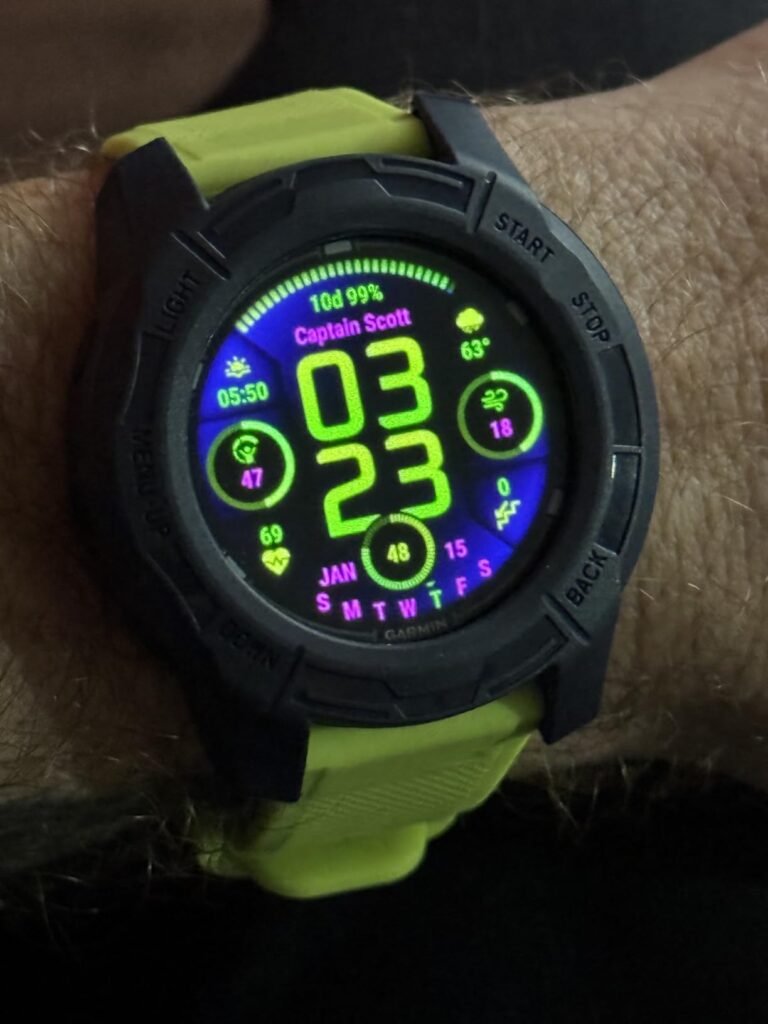
The Garmin Descent G2 blurs the line between a capable dive computer and a full-featured multisport smartwatch. Its 1.2-inch AMOLED display delivers bright, saturated colors that remain legible in low-visibility water, and the sapphire lens resists scratches from boat ladders, coral, and sand. Above the surface, it functions as a daily smartwatch with notifications, contactless payments, and health tracking, which means you can leave your regular watch at home during dive trips.
We may earn a commission when you buy through this link, at no additional cost to you.
Multi-GNSS support lets you mark your exact surface entry and exit points, a feature that proves surprisingly useful when diving from shore or navigating back to a mooring line in current. The dive readiness feature analyzes your sleep, stress, and recent activity to suggest whether your body is prepared for another dive, which adds a layer of safety for multi-day liveaboard schedules where fatigue can accumulate quickly.
Battery life reaches 27 hours in dive mode and up to 10 days in smartwatch mode, giving you plenty of headroom for week-long trips without a charger. The watch supports recreational, advanced, technical, freediving, and pool apnea modes, so it adapts as your training progresses. The housing is made from recycled ocean-bound plastics, which is a welcome detail for divers who care about marine conservation.
Fatigue is one of the most overlooked risk factors in diving, especially on liveaboards where you may log three or four dives per day. The G2’s dive readiness metric pulls data from your sleep quality, heart rate variability, and recent exercise load to give you a simple preparedness score. While this should never replace conservative dive planning and proper surface intervals, it provides an additional data point that can help you decide whether to sit out a dive or adjust your profile.
The G2 is ideal for divers who want a single device that handles both underwater navigation and everyday fitness tracking. If you do not need smartwatch features and only want a dedicated dive computer, the price may feel steep. But for those who value versatility and plan to advance into technical diving, the G2 offers a feature set that grows with your skills.
Budget-conscious recreational divers who only need basic no-deco tracking will find the smartwatch features unnecessary and the price hard to justify.
We may earn a commission when you buy through this link, at no additional cost to you.
The Garmin Descent X50i occupies the top of the lineup with a 3-inch color touchscreen that makes dive data, ascent profiles, and depth charts immediately readable at a glance. The sheer screen real estate means you can display more information simultaneously without cycling through pages, which is a genuine safety advantage during complex decompression dives where you need to monitor gas switches, deco ceilings, and tank pressures at the same time.
We may earn a commission when you buy through this link, at no additional cost to you.
SubWave sonar technology sets this model apart from nearly everything else on the market. When paired with Descent T2 transceivers, it allows diver-to-diver messaging up to 30 meters and lets you monitor tank pressures, distances, and depths for up to eight divers within a 10-meter range. This is invaluable for technical teams, cave diving groups, or instructors managing multiple students in limited visibility. The integrated backup dive light is another thoughtful addition that can save a dive if your primary torch fails.
The 20 ATM depth rating and sapphire lens give the X50i the structural integrity to handle serious depth, while the leakproof metal inductive buttons eliminate the mechanical failure points that traditional push-buttons can develop over years of heavy use. DiveView maps with bathymetric contours for over 4,000 dive sites help you plan descents before you even enter the water, giving you a mental picture of the underwater topography.
Underwater communication has traditionally relied on hand signals, slates, or expensive full-face mask systems. SubWave sonar offers a middle ground by letting you send preset text messages to nearby divers through the water column. This is particularly useful in low-visibility conditions where visual signals are impossible, or when team members are spread across a wreck or reef. The ability to monitor a buddy’s tank pressure remotely adds another layer of safety during deep or overhead dives.
This is the computer for technical divers, cave explorers, and dive professionals who need every available tool to manage risk. The price reflects the feature density, and casual recreational divers will not benefit from most of its capabilities. If your diving involves overhead environments, extended deco obligations, or team coordination, the X50i provides a level of situational awareness that simpler units simply cannot match.
Recreational divers on a budget who dive shallow reefs and do not need air integration or team communication features.
We may earn a commission when you buy through this link, at no additional cost to you.
The Cressi Leonardo 2.0 is designed around a single principle: keep things simple. The entire interface revolves around one button, which means there is virtually no learning curve for new divers who are already managing buoyancy, equalization, and navigation during their first open-water dives. You cycle through Air, Nitrox, and Gauge modes with a single press, and the computer handles the rest automatically.
We may earn a commission when you buy through this link, at no additional cost to you.
Safety alarms are both visual and audible, which provides redundant notification when you approach no-decompression limits, ascend too quickly, or miss a safety stop. For newer divers who may not yet have the habit of checking their computer every few minutes, the audible alert can be the difference between a safe ascent and a missed deco obligation. The alarms are loud enough to hear through a hood in moderate current.
Data management is more flexible than you might expect at this price. The Leonardo 2.0 connects to both iOS and Android devices for dive log analysis, and it supports both USB and infrared data transfer for compatibility with older desktop software. This dual-path approach means you can start with the smartphone app and migrate to more detailed desktop analysis as your interest in dive planning grows.
When you are 40 feet down on your tenth lifetime dive, the last thing you want is to fumble through a multi-button menu system while your buoyancy drifts. A single-button design eliminates configuration anxiety and lets you focus on the fundamentals of safe diving. The Leonardo 2.0 auto-activates when it detects water pressure, so you do not even need to remember to turn it on before your giant stride entry.
This is an ideal first computer for open-water students and casual vacation divers who want reliable no-deco tracking without navigating complex menus. The tradeoff is that advanced features like multi-gas switching, air integration, and compass navigation are absent. If you plan to pursue technical certifications in the near future, you may want to invest in a more capable unit from the start to avoid buying twice.
Advanced or technical divers who need multi-gas support, air integration, or detailed decompression planning tools.
We may earn a commission when you buy through this link, at no additional cost to you.
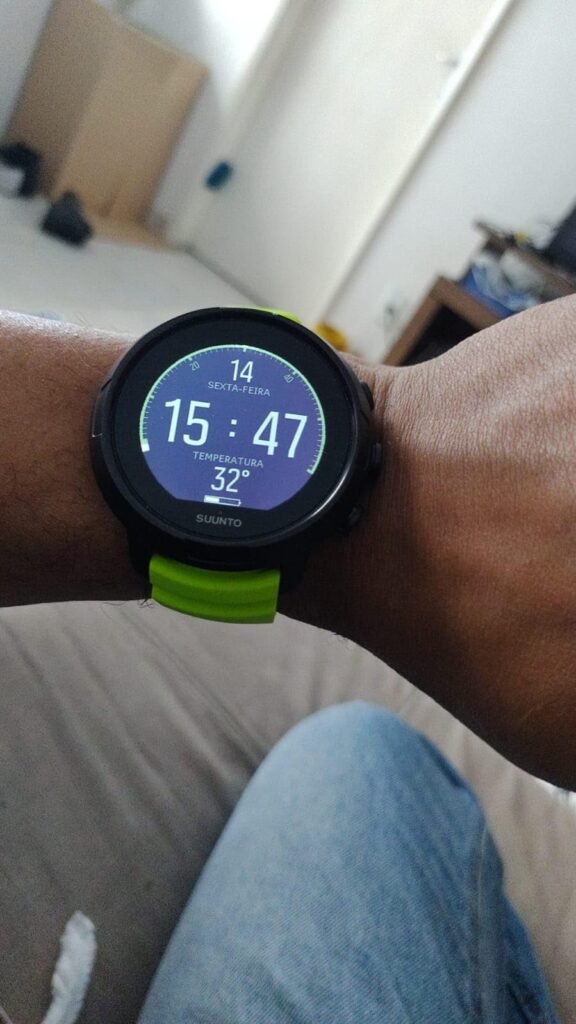
The SUUNTO D5 packs a surprising amount of capability into a compact wrist-mounted form factor. Its color display provides clear differentiation between depth, time, and no-deco data, which is easier to parse at a glance than monochrome screens in murky conditions. The 100-meter water resistance rating covers the full range of recreational diving and most advanced recreational profiles with margin to spare.
We may earn a commission when you buy through this link, at no additional cost to you.
Wireless tank pressure monitoring is the headline feature here. By pairing with a compatible transmitter on your first stage, you can see your remaining gas supply directly on the wrist display without reaching for your SPG. This reduces task loading during safety stops and navigation exercises, and it provides an early warning if your consumption rate spikes due to current or stress. The digital compass adds another layer of orientation that eliminates the need for a separate wrist-mounted compass.
Vibration alarms supplement the visual alerts, which is particularly useful in cold water when thick hoods muffle audible signals. The mobile connection lets you sync dive logs wirelessly to the Suunto app for post-dive review and social sharing. Battery life is rechargeable, which simplifies maintenance compared to user-replaceable cells, though you will need to plan charging around your dive schedule.
Many air-integrated dive computers are console-mounted or housed in large wrist units that feel cumbersome on smaller wrists. The D5 maintains a relatively compact profile while still supporting wireless tank pressure, making it a practical option for divers who want gas monitoring without the visual and physical bulk of a console setup. Just remember to purchase the compatible transmitter separately, as it is not included in the base package.
The D5 is a solid choice for recreational divers who want air integration and a compass without stepping up to a full technical computer. The 100-meter depth ceiling and the lower owner rating suggest that it may not satisfy divers pushing into deeper or more demanding profiles. If your diving stays within recreational limits and you value a compact, colorful display, the D5 offers a well-rounded package.
Technical divers who routinely exceed 100 meters or need multi-gas trimix support for extended decompression dives.
We may earn a commission when you buy through this link, at no additional cost to you.
The Garmin Descent X30 targets divers who spend as much time navigating to dive sites as they do exploring them. The built-in surface GPS lets you mark entry and exit points, navigate back to a mooring buoy, or log the exact coordinates of a productive reef for future visits. This is especially valuable for shore divers, kayak divers, and anyone who frequently explores unmarked sites without a fixed reference point.
We may earn a commission when you buy through this link, at no additional cost to you.
Underwater, the NDL Aware depth metrics provide real-time feedback on how specific depth changes affect your no-decompression limit. Instead of simply displaying a static NDL countdown, the X30 shows you the immediate impact of dropping five feet deeper or ascending to a shallower shelf. This dynamic feedback encourages better depth discipline and can help you squeeze extra bottom time out of a dive by staying in the optimal depth range.
The 2.4-inch color display is large enough to show up to three data fields per page, and the customizable screen layouts let you prioritize the information that matters most for your dive profile. The flip-screen mode is a clever feature that reorients the button layout when you rotate the housing, accommodating different wrist positions and glove configurations. The 3-axis digital compass and water temperature sensor round out a comprehensive navigation and environmental toolkit.
Traditional dive computers display a single no-decompression limit number that updates periodically. The X30’s NDL Aware system goes further by showing you the projected impact of depth changes in real time, effectively teaching you how your profile affects your available bottom time. This is particularly useful during multi-level dives where small depth adjustments can significantly extend or shorten your no-deco window. Over time, this feedback helps divers develop more efficient profiles without conscious calculation.
This computer is best suited for adventurous divers who explore varied sites and want GPS tracking alongside solid multi-gas support including trimix. The lack of air integration means you will still need a separate SPG or transmitter-compatible computer for gas monitoring. If navigation and dive planning are your priorities, the X30 delivers a feature set that few competitors can match at this price point.
Divers who require wireless air integration to monitor tank pressure on their wrist during deep or overhead dives.
We may earn a commission when you buy through this link, at no additional cost to you.
The Garmin Descent G1 takes a different approach to the dive-smartwatch hybrid by prioritizing battery endurance and ruggedness over display vibrancy. Its monochrome screen sacrifices the color pop of AMOLED panels in exchange for dramatically lower power consumption, delivering up to 25 hours in dive mode and an impressive 21 days in smartwatch mode. For extended expeditions where charging opportunities are limited, this endurance advantage can be the deciding factor.

We may earn a commission when you buy through this link, at no additional cost to you.
The sapphire lens provides excellent scratch resistance against the inevitable contact with boat hardware, tank valves, and rocky shore entries. Multi-GNSS positioning covers GPS, GLONASS, and Galileo satellite systems for accurate surface tracking, and the computer supports recreational, advanced, technical, freediving, and even spearfishing modes. This breadth of discipline support means the G1 can serve as your primary computer across multiple certifications and diving styles.
Onboard storage holds up to 200 dives, which you can upload and review through the Garmin Dive smartphone app. The app also lets you search for dive sites worldwide, adding a planning dimension that standalone computers lack. With over 30 built-in sport apps and health monitoring features including heart rate, Pulse Ox, and Body Battery energy tracking, the G1 doubles as a capable fitness watch for the surface intervals between dives.
Color displays look impressive on the surface, but monochrome screens often provide superior contrast in dim or turbid water where color saturation drops rapidly with depth. The G1’s high-contrast monochrome panel remains legible in conditions where color screens can appear washed out. The tradeoff is that color-coded warnings and gas-mix indicators are less intuitive, so you will rely more on numerical values and icon shapes to interpret critical data at depth.
The G1 is ideal for expedition divers, freedivers, and multi-sport athletes who need a single device that handles everything from deep deco dives to trail runs. The monochrome display is a tradeoff that some divers will find limiting in low-light conditions, but the battery longevity and rugged construction more than compensate for most users. If you value endurance over screen aesthetics, the G1 is a compelling choice.
Divers who prioritize vivid color displays and real-time air integration for technical diving scenarios.
We may earn a commission when you buy through this link, at no additional cost to you.
The Cressi Da Vinci stands out with a 120-meter depth rating that exceeds most recreational dive computers by a significant margin. This extra depth headroom provides a comfortable safety buffer for advanced recreational divers and opens the door to deeper exploration as your training progresses. The integrated digital compass eliminates the need for a separate navigation instrument, reducing wrist clutter and simplifying your gear configuration.
We may earn a commission when you buy through this link, at no additional cost to you.
The 1.54-inch full-color LCD delivers clear data presentation even in low-light conditions, which is important when diving deeper walls or exploring wrecks where ambient light diminishes quickly. Air, Nitrox, and Gauge modes cover the standard recreational spectrum, and the color display makes it easy to distinguish between depth, time, and no-deco information at a glance. The interface balances information density with readability, avoiding the cluttered feel that some color screens produce.
Battery life reaches 25 hours on a single charge, which is sufficient for multi-day dive trips without requiring daily charging. The rechargeable design simplifies long-term ownership compared to user-replaceable cells, though you will want to bring a charging cable on extended liveaboard trips. The combination of depth capability, compass navigation, and color display positions the Da Vinci as a versatile mid-range option for divers who want more than the basics.
Most recreational diving stays well above 40 meters, so a 120-meter rating may seem excessive. However, the higher rating reflects stronger housing construction and more robust seal engineering, which translates to better long-term reliability even at shallower depths. Divers who frequent deep walls, blue holes, or technical training environments will also appreciate the extra margin, since a computer rated to 100 meters provides zero safety buffer if you accidentally exceed that limit during a deep deco dive.
This computer is well suited for advanced recreational divers who occasionally push deeper and want integrated navigation without carrying extra instruments. The lack of an owner rating at this time means you are relying on the specification sheet rather than community feedback, which is worth considering if you prefer proven track records. If the depth rating and compass align with your diving plans, the Da Vinci offers a compelling feature set at a competitive price.
Divers who need air integration or multi-gas trimix support for extended technical decompression profiles.
We may earn a commission when you buy through this link, at no additional cost to you.
Selecting a dive computer involves balancing safety features, usability, and budget against the type of diving you actually do. The following factors will help you narrow the field and avoid paying for capabilities you will never use or missing features that could improve your safety underwater.
The decompression algorithm is the mathematical engine that calculates your no-decompression limits, tissue gas loading, and ascent profiles. Common models include Buhlmann ZH-L16C, RGBM, and VPM-B, each with different approaches to bubble mechanics and tissue saturation. Most recreational divers will never notice a practical difference between these algorithms under normal conditions, but the conservatism settings that accompany them can significantly affect your available bottom time and safety stop requirements.
Gradient factors, conservatism levels, or personal adjustment settings allow you to make the algorithm more or less aggressive based on your risk tolerance, fitness level, and diving conditions. Cold water, heavy exertion, dehydration, and repetitive diving all increase decompression stress, and a good computer lets you dial in extra conservatism when conditions warrant it. Understanding how to adjust these settings is more important than debating which algorithm is theoretically superior, since real-world diving involves variables that no model can perfectly predict.
Choose a computer with an algorithm that is well-established in the diving community and offers adjustable conservatism. Avoid models that lock you into a single fixed setting, since your needs will change as you gain experience and encounter different diving environments.
Dive computer displays fall into three main categories: monochrome LCD, color LCD, and AMOLED. Monochrome screens offer the best battery efficiency and strong contrast in low-light conditions, making them popular for expedition and freediving use. Color LCD panels provide better data differentiation through color-coded warnings and gas indicators, while AMOLED displays deliver the brightest, most vivid presentation at the cost of higher power consumption.
Screen size and layout matter as much as display technology. A larger screen can show more data fields simultaneously, reducing the need to scroll through pages during a dive. However, larger screens also increase the physical footprint of the computer, which can feel bulky on smaller wrists or interfere with wetsuit cuffs. Look for a display that presents your most critical information, depth, time, no-deco limit, and ascent rate, in a single glance without requiring button presses.
Prioritize readability over resolution. A high-resolution screen that becomes unreadable in green water at 80 feet is less useful than a simpler display with strong contrast and large numerals. If you frequently dive in low-visibility conditions, consider a model with adjustable backlight intensity and high-contrast display modes.
Single-gas computers support air or one Nitrox mix, which covers the needs of most recreational divers. If you hold a Nitrox certification and routinely dive with enriched air, make sure the computer allows you to set your oxygen fraction before each dive. The range of supported oxygen percentages varies by model, with most recreational units covering 21 to 50 percent, which handles the standard EANx32 and EANx36 mixes.
Multi-gas computers allow you to switch between different gas mixtures during a single dive, which is essential for technical diving with decompression gases or trimix. If you plan to pursue technical certifications such as TDI Advanced Nitrox, Decompression Procedures, or Trimix, investing in a multi-gas computer now avoids the need for a costly upgrade later. Multi-gas models also tend to offer more sophisticated decompression planning tools and gas management features.
Match your gas compatibility needs to your current certification and realistic training plans for the next two to three years. Buying a trimix-capable computer when you only dive air on tropical reefs is unnecessary, but buying a single-gas unit when you are six months away from your deco procedures course is a false economy.
Air integration connects your dive computer to a transmitter mounted on your regulator’s first stage, displaying real-time tank pressure on the computer screen. This eliminates the need to check a separate submersible pressure gauge and provides continuous gas consumption data that can alert you to leaks, regulator free-flows, or unexpectedly high breathing rates. For divers who frequently dive in current, overhead environments, or low visibility, the situational awareness that air integration provides is a genuine safety enhancement.
Not all air-integrated computers are created equal. Some models support a single transmitter for one tank, while others can monitor multiple tanks simultaneously, which is critical for sidemount and technical configurations. The wireless range and reliability of the transmitter connection also vary, so check whether the system maintains a stable link at the distances and depths you typically dive. Remember that the transmitter is usually sold separately and adds to the total cost.
Air integration is worth the investment if you dive frequently in challenging conditions or are progressing toward technical diving. For casual recreational divers who always dive with a buddy and maintain good gas management habits, a standalone SPG remains a reliable and much less expensive alternative.
Dive computers use either user-replaceable batteries or rechargeable cells, and each approach has distinct advantages. Replaceable batteries like the CR 2450 can be swapped in minutes before a trip, ensuring you never miss a dive due to a dead computer. The tradeoff is that battery compartment seals wear over time and require periodic replacement to maintain water resistance. Rechargeable batteries eliminate seal maintenance and ongoing battery costs, but they require access to a power source between dives.
Battery life varies dramatically depending on display technology, sensor usage, and backlight settings. A monochrome computer with basic sensors may last hundreds of dives on a single cell, while a color AMOLED display with GPS, air integration, and continuous heart rate monitoring may need charging every few days. Consider your typical dive trip length and charging access when evaluating battery specifications. A computer that lasts 30 hours in dive mode is more than sufficient for most week-long liveaboard schedules.
For expedition divers and remote destinations where charging is unreliable, a user-replaceable battery or a model with exceptional rechargeable endurance is the safer choice. For resort divers with easy access to power outlets, a rechargeable model with a wireless charging dock offers the most convenient ownership experience.
The depth rating indicates the maximum pressure the computer’s housing and seals can withstand. Recreational dive computers typically carry ratings between 100 and 120 meters, which provides a substantial safety margin above the 40-meter recreational limit. Technical models may be rated to 200 meters or more, reflecting the stronger construction needed for deeper profiles. A higher depth rating generally correlates with better overall build quality, even if you never approach the rated maximum.
Build materials matter as much as the depth number. Sapphire crystal lenses resist scratches far better than mineral glass or plastic, which is important when your computer contacts tank valves, boat ladders, and rocky shore entries. Stainless steel bezels and buttons, particularly 316 marine grade, resist saltwater corrosion better than plated brass or anodized aluminum. Leakproof inductive buttons eliminate the mechanical seals that can fail on traditional push-button designs after years of heavy use.
Choose a depth rating that exceeds your planned maximum depth by at least 50 percent, and prioritize sapphire lenses and marine-grade steel if you dive frequently in saltwater. A computer that survives five years of heavy use without seal failures or screen scratches will ultimately cost less than replacing a cheaper unit every two seasons.
Modern dive computers offer Bluetooth or Wi-Fi connectivity for wireless dive log transfers to smartphone apps and cloud platforms. This convenience eliminates the need for USB cables and infrared adapters, making it easy to review your profiles, share dives with buddies, and track your cumulative dive hours over time. Some ecosystems also provide dive site databases, planning tools, and social features that add value beyond basic log storage.
Onboard storage capacity determines how many dives you can log before needing to offload data. Most current models store between 100 and 200 dives, which is sufficient for several months of active diving. If you dive frequently on liveaboards or expeditions where connectivity is limited, higher onboard capacity provides peace of mind that you will not lose data between syncs.
Prioritize Bluetooth connectivity and a companion app that is compatible with your smartphone operating system. The ability to review your dive profiles on a larger screen after a trip is invaluable for identifying areas where you can improve your depth control, ascent rate, and gas management.
Dive computers come in two main form factors: watch-style units that fit on your wrist like a regular timepiece, and larger console or puck-style units that mount on your regulator hose or strap to your forearm. Watch-style computers have become the dominant format because they double as everyday smartwatches and are less likely to snag on lines or equipment. Console-mounted units remain popular in rental fleets and among divers who prefer a larger display that is always visible without rotating their wrist.
Wrist comfort and band compatibility matter more than most buyers anticipate. A computer that feels fine in the dive shop may become uncomfortable after three hours in cold water with a thick wetsuit. Look for models with adjustable silicone bands, quick-release mechanisms, and housing profiles that sit flat against the wrist. If you plan to wear the computer as a daily watch, consider the overall thickness and weight, since bulky dive computers can feel intrusive under shirt cuffs.
Try to match the form factor to your primary diving style. Watch-style computers are the most versatile for divers who want a single device for diving, fitness, and daily wear. Console or puck-style units may be preferable for rental operations or divers who want the largest possible display without wearing a bulky watch every day.
Before every dive, verify that your computer is set to the correct gas mix, altitude setting, and conservatism level for the conditions you will encounter. Activate the unit well before entering the water so it can acquire satellite locks if it has GPS features and confirm that all sensors are reading correctly. After the dive, allow the computer to complete its surface interval calculations before turning it off, since interrupting the desaturation tracking can affect the accuracy of subsequent dive planning.
Rinse your dive computer thoroughly in fresh water after every saltwater dive, paying special attention to the sensor ports, button crevices, and charging contacts. Salt crystals can corrode metal components and degrade seals over time, so a gentle soak in lukewarm fresh water followed by a soft cloth drying is the most effective maintenance routine. Avoid using solvents, compressed air, or high-pressure water jets, which can damage the pressure sensor or force moisture past the seals.
Store your computer in a cool, dry location away from direct sunlight and extreme temperatures when not in use. If the unit uses a rechargeable battery, maintain a partial charge during long storage periods rather than letting it drain completely, which can reduce overall battery lifespan. Check the manufacturer’s recommended service intervals for seal replacements and sensor calibrations, and have these performed by an authorized service center to maintain the depth rating and water resistance integrity.
Dive tables provide a conservative baseline for no-decompression planning, but they assume a square profile where you stay at maximum depth for the entire dive. A dive computer continuously recalculates your tissue loading based on your actual depth changes, giving you more accurate no-deco limits and safer ascent guidance. For multi-level dives, repetitive diving, and Nitrox use, a computer provides safety margins that tables simply cannot match.
Air mode assumes you are breathing standard atmospheric air with 21 percent oxygen. Nitrox mode lets you input a higher oxygen fraction, typically between 22 and 50 percent, which reduces nitrogen absorption and extends your no-decompression limits at moderate depths. You must hold a Nitrox certification and analyze your tank's oxygen content before setting the computer to Nitrox mode, since incorrect settings can create oxygen toxicity risks at depth.
User-replaceable batteries like the CR 2450 typically last between 100 and 300 dives depending on the model and usage patterns. Rechargeable batteries should be charged between dive days and will maintain good capacity for several years before needing replacement. Always check your battery level before a dive trip and carry a spare cell if your model supports user replacement, since a dead computer means you cannot safely dive.
Many modern dive computers include a dedicated freediving mode that tracks depth, dive time, surface intervals, and descent rate without applying decompression algorithms that are irrelevant to breath-hold diving. Models like the Garmin Descent G1 and G2 support freediving and pool apnea alongside scuba modes. Make sure the computer you choose explicitly lists freediving compatibility, since using a scuba-only computer for freediving can produce inaccurate data and confusing alerts.
Air integration provides real-time tank pressure monitoring on your wrist, which reduces task loading and improves situational awareness during complex dives. It is particularly valuable in low visibility, strong current, or overhead environments where checking a console gauge is difficult. For casual recreational diving in calm conditions, a standard SPG is sufficient and much less expensive, so the value of air integration depends on the type of diving you do most frequently.
Most dive computers display a no-fly countdown timer after your last dive, typically recommending 18 to 24 hours before ascending to altitude. This timer accounts for residual nitrogen in your tissues that could expand at reduced cabin pressure and cause decompression sickness. Always follow the more conservative recommendation between your computer's no-fly timer and the guidelines published by DAN or your training agency, and avoid flying if the timer has not fully expired.
Dive computers do not require the same annual servicing as regulators, but they do benefit from periodic seal inspections and sensor calibrations, especially if you dive frequently in saltwater. Most manufacturers recommend a professional inspection every two to three years or after any significant impact or flooding event. Keeping the unit clean, rinsing it after every dive, and storing it properly will extend the intervals between service visits and maintain water resistance.
If your computer fails underwater, ascend slowly to your safety stop depth and complete a conservative safety stop before surfacing. Do not attempt to continue the dive or rely on a buddy's computer for your decompression data, since their tissue loading will differ from yours. After surfacing, wait at least 24 hours before diving again and consult your training materials for emergency procedures. Carrying a backup computer or a depth gauge and timer is recommended for deeper or more complex dives.
Yes, most dive computers operate across a wide temperature range and automatically compensate for water temperature in their calculations. However, cold water increases decompression stress due to reduced circulation and thicker thermal protection, so consider increasing your conservatism setting when diving in temperatures below 15 degrees Celsius. Make sure the buttons and display remain usable with thick neoprene gloves, since some touchscreen models can be difficult to operate in cold-water configurations.
The Shearwater Tern TX stands out as the strongest overall choice in this comparison, combining the highest owner rating with wireless air integration, premium 316 stainless steel construction, and a vibrant color display. It represents the kind of long-term investment that pays dividends in safety and durability across hundreds of dives, making it the top recommendation for divers who want a single computer that handles everything from recreational Nitrox to advanced multi-gas profiles.
For divers on a tighter budget, the Mares Puck Pro Ultra delivers a proven Buhlmann decompression algorithm, Bluetooth logging, and Nitrox compatibility at a fraction of the cost. The Shearwater Peregrine offers the best balance of interface simplicity and rechargeable convenience in the mid-range, while the Garmin Descent G2 and X30 appeal to divers who want GPS navigation and smartwatch features alongside capable dive computer functionality.
Your best choice ultimately depends on your certification level, typical dive profiles, and how quickly you plan to advance into technical diving. Start by identifying the three features that matter most for your diving, whether that is air integration, multi-gas support, or battery endurance, and use this guide to find the model that delivers those capabilities within your budget. A well-chosen dive computer is one of the most important safety investments you can make, so take the time to match the features to your actual needs rather than chasing specifications you will never use.