XVX Metal Liquid
8.8Editor scoreSingle 1U accent keycap
Layered metallic transparent build
RGB shine through core
Fits MX cross stems
Find the right custom keycaps for 2026. We compare 10 standout options by build quality, useful features, owner feedback, value, and everyday trade-offs.
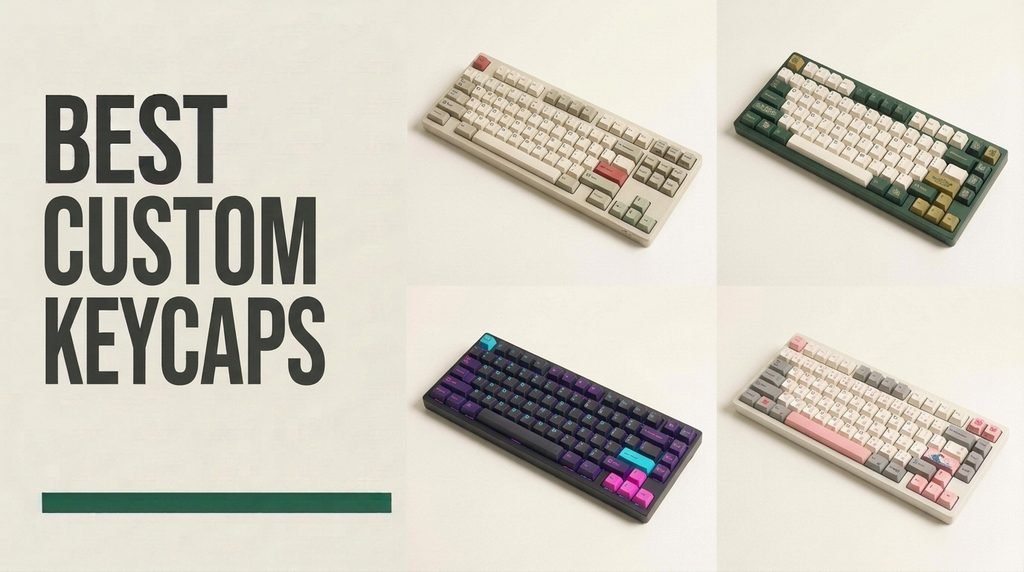
Find the right custom keycaps for 2026. We compare 10 standout options by the factors that matter in this category, such as PBT versus polycarbonate plastics, Cherry and OEM sculpted profiles, wall thickness, doubleshot and dye-sublimated legends, RGB shine-through diffusion, layout coverage, and artisan craftsmanship.
Swapping out thin, oil-prone factory caps is the fastest way to transform how a mechanical keyboard looks, sounds, and feels under your fingertips. Whether you want a complete 136-key set that deepens keystroke acoustics or a single sculpted 1U artisan piece for your Escape key, material choice dictates long-term satisfaction.
Keyboard layouts and LED orientations also play a critical role in compatibility. South-facing RGB boards pair naturally with side-printed legends, while compact 65 percent and 75 percent keyboards require extra-short shift and modifier keys. Comparing stem fitment, row profiles, and legend molding ensures a seamless upgrade.
We compared 10 custom keycaps using the details that actually help a buyer decide: polymer durability, wall thickness, keycap height profiles, legend molding methods, north- versus south-facing RGB compatibility, modifier key coverage across keyboard sizes, and artisan casting detail. The notes focus on practical trade-offs so each pick feels connected to how enthusiasts build, type on, illuminate, and personalize mechanical keyboards.
Compare key features, scores, and current prices side by side. A shorter feature list means fewer details were available, not necessarily fewer capabilities.



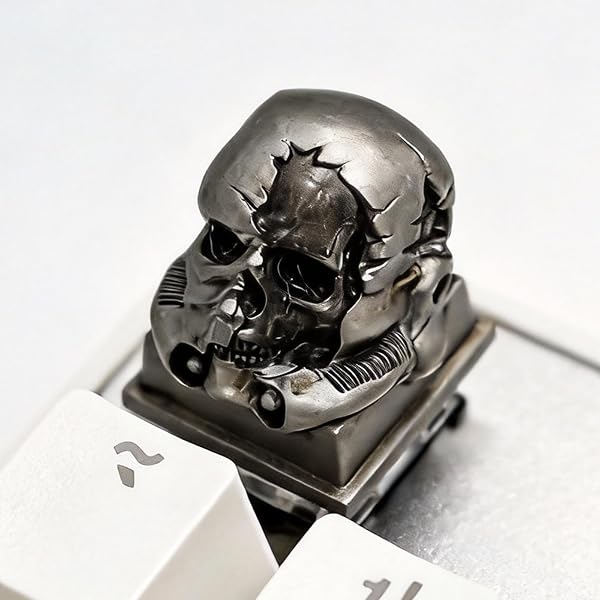
For mechanical keyboard builders drawn to dark fantasy, cyberpunk, or industrial post-apocalyptic desk themes, a mass-produced plastic Escape key can make a custom board feel unfinished. This Silver Skull Artisan Keycap functions as a miniature piece of hand-finished sculpture for any 1U switch position. Molded with realistic battle-damaged fractures, recessed eye sockets, and exposed teeth over a sturdy square base, it receives a deliberate dark aging wash inside the surface cracks that creates dramatic light-and-shadow depth on your desk.
We may earn a commission when you buy through this link, at no additional cost to you.
Rather than using fragile painted coatings that chip under fingernails, this artisan piece is crafted from durable resin through a multi-layer casting process. The metallic silver pigment and weathered patina are locked into the material itself, providing high resistance to heat, skin oils, and daily wear while maintaining a smooth, polished tactile surface that wipes clean effortlessly.
Underneath the square 1U base sits a standard MX cross stem compatible with Cherry MX, Gateron, Kailh, Outemu, and similar mechanical switches across full-size, TKL, 75%, 60%, or standalone numpad keyboards. Because handmade resin stems are cast to snug tolerances so the cap never wobbles during presses, the stem hole can occasionally feel tight on slightly oversized switch stems; warming the bottom stem socket with a hairdryer for a few seconds softens the resin just enough for a custom, locked-in press fit.
Never force a tight handmade resin artisan cap onto a mechanical switch stem with excessive downward pressure, as that can stress the switch housing. Gently blowing warm air from a hairdryer onto the underside of the keycap for five to ten seconds makes the resin stem slightly pliable so it seats smoothly onto the cross stem.
Because the sculpted cranium rises higher and features more three-dimensional relief than a flat OEM or Cherry keycap, you should install it on peripheral 1U keys like Escape, Delete, Pause, or a corner macro key rather than main typing letters. Arriving in elegant gift-ready packaging with a 4.9-star owner rating, it is a standout finishing touch for dark custom builds.
Users who want bright RGB light shining directly through the top of their Escape key.
We may earn a commission when you buy through this link, at no additional cost to you.
Keyboard hobbyists who want to give a stealthy black or silver mechanical board an immediate focal point without replacing every single cap on the deck will gravitate toward the XVX Metal Liquid 1U Keycap. Inspired by organic sci-fi symbiote tendrils, this single-key replacement pairs a raised, metallic-textured outer cage over a crystal-clear inner core. Under a ten-dollar bill, it turns a frequently hit corner key—such as Escape, Delete, or an isolated directional arrow—into a glowing centerpiece.
We may earn a commission when you buy through this link, at no additional cost to you.
The dual-layer construction is specifically engineered to showcase per-key RGB lighting. Solid metal artisan caps often block switch LEDs completely, leaving a dark dead spot in the corner of an illuminated gaming board. By wrapping the silver-finished liquid tendrils around a transparent inner shell, the XVX cap pipes switch light up through the center and out the sides, shifting color dynamically to match whatever static or rainbow lighting profile you run.
Installation takes seconds on virtually any modern mechanical keyboard. Beneath the hood sits a standard plus-shaped cross stem socket that presses directly onto Cherry MX, Gateron, Kailh, and compatible clone switches without adapters. Because the sculpted tendrils wrap smoothly over the 1U cube corners, your fingertip can locate the Escape or Delete key by touch alone without looking down from your monitor.
This liquid-metal design pairs particularly well with black, gunmetal, or clear polycarbonate keycap sets. Placing it on the top-left Escape switch draws the eye naturally while keeping its raised organic texture away from fast home-row touch-typing.
Shoppers should double-check the package quantity before ordering: this listing includes exactly one 1U keycap, so outfitting a full four-key WASD or arrow cluster requires purchasing four individual units. If you want an eye-catching, backlit sci-fi accent key that installs in five seconds and fits any standard MX switch, this single cap delivers dramatic visual impact for minimal cash.
Buyers looking for a complete full-keyboard replacement set or a flat, uniform typing surface.
We may earn a commission when you buy through this link, at no additional cost to you.
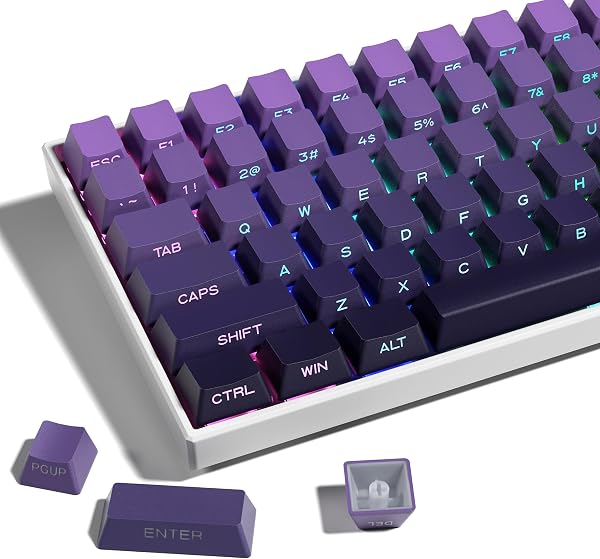
Modern custom mechanical keyboards overwhelmingly use south-facing RGB switch sockets—orienting the LED toward the typist—which causes traditional top-printed shine-through keycaps to look dim and unevenly lit. Earning our Best Value badge, the XVX Gradient Purple Side-Print 136-Key Set solves south-facing lighting while delivering a striking, minimalist desk aesthetic for just over twelve dollars. By moving the translucent wide-font legends to the front vertical skirt facing the user, every character sits directly over south-facing LEDs while leaving the top key surfaces completely blank and uninterrupted.
We may earn a commission when you buy through this link, at no additional cost to you.
Material and molding quality punch well above the budget price tag. Instead of thin painted ABS plastic that wears off or turns greasy within months, XVX molds these 136 keys from textured, high-grade PBT using a true double-shot process. The translucent legend plastic is permanently injected inside the colored PBT shell, meaning the characters cannot scratch off or fade no matter how heavily you game or code. Across the rows, the colorway transitions smoothly from pale lavender at the top function row down to deep royal purple at the spacebar.
Ergonomics and layout compatibility are equally accommodating. The set uses the familiar OEM profile—sculpted at slightly taller row angles than Cherry profile—to support natural finger reach across long workdays. With 104 standard keys plus 32 supplementary modifiers, the kit fits 61, 64, 68, 84, 87, 96, 98, 100, 104, and 108-key mechanical keyboards across both US ANSI and UK layouts utilizing Cherry MX, Gateron, or Kailh switches.
When seated at a desk with your keyboard at arm’s length, you naturally view your keyboard at a 30- to 45-degree angle rather than straight down from the ceiling. Front-facing legends remain clearly legible from your chair while presenting a sleek, legend-free gradient from across the room.
Before buying, check which direction your keyboard’s switch LEDs face. While the gradient purple tops look clean on any board, south-facing LEDs make the front legends glow vividly, whereas older north-facing gaming keyboards place the LED on the opposite side of the switch stem away from the front wall. For owners of south-facing 65%, 75%, or full-size boards, this set is an unbeatable value.
Keyboards with strictly north-facing LEDs if bright legend illumination is your top priority.
We may earn a commission when you buy through this link, at no additional cost to you.
Programmable macro pads, QMK/VIA custom keyboards, and specialized workstations for video editing, streaming, or flight simulation are only as useful as your ability to remember what each custom key actually triggers. These Instantly Customizable DIY Double-Layer Keycaps—often known in the keyboard community as relegendable keycaps—eliminate guesswork and messy tape labels. Each cap consists of a colored bottom stem base topped by a snap-on transparent protective lens.
We may earn a commission when you buy through this link, at no additional cost to you.
Practicality is the defining strength of this two-piece architecture. Whenever you program a new shortcut layer for DaVinci Resolve, Photoshop, OBS Studio, or accounting macros, you simply pop the clear top cover off using your fingernail, drop in a small square of printed paper, handwritten cardstock, or a custom icon sticker, and snap the clear cover back down. Because your fingers touch only the smooth outer polycarbonate lens, the paper legend underneath stays completely shielded from skin oils, coffee spills, and friction.
Because the underside uses a standard Cherry MX cross stem mount, you can populate an entire external numpad or 9-key macro pad with custom labels, or drop three or four relegendable caps onto the unused function or navigation keys of your main mechanical keyboard. Swapping labels takes under ten seconds per key and requires zero special tools or permanent adhesives.
To get the cleanest professional look inside the transparent cover, print your icons or two-line text labels on heavyweight matte photo paper or colored cardstock using a standard grid template. Thicker paper sits completely flat under the clear lens without curling in humid rooms.
Keep in mind that these are purpose-built utility caps rather than heavy acoustic enthusiast caps; the two-piece hollow shell produces a higher-pitched click than solid 1.5mm PBT, and you will need scissors or a label maker to create your paper inserts. For streamers, editors, programmers, and office pros building visual shortcut decks, these double-layer caps are an indispensable organizational tool.
Enthusiasts seeking a deep, thocky typing sound across a full alphanumeric keyboard.
We may earn a commission when you buy through this link, at no additional cost to you.
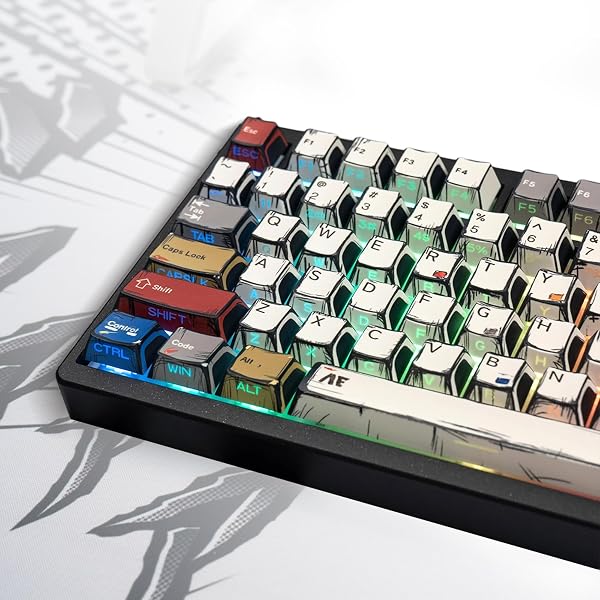
Most custom keycap sets force you to choose between two incompatible features: vibrant multi-color graphic artwork (achieved via dye-sublimation on opaque caps) or backlit shine-through legends (usually restricted to plain solid-colored caps). Earning our Premium Pick designation, this 137-Key Versatile PBT Keycap Set bridges both worlds. By combining ultra-durable double-shot PBT construction with high-definition dye-sublimation printing, it delivers expressive anime- and comic-inspired color themes across the board while still allowing crisp, high-contrast RGB legends to glow through the keys.
We may earn a commission when you buy through this link, at no additional cost to you.
Typing feel and acoustics receive an immediate upgrade thanks to the sculpted Cherry profile geometry. Slightly shorter and more contoured than factory OEM keycaps, Cherry profile reduces vertical finger travel during rapid gaming or touch-typing and creates a smaller internal resonant cavity beneath each key. Combined with dense PBT walls, that lower cavity shifts your keyboard’s acoustic signature toward a deeper, fuller sound preferred by custom keyboard enthusiasts.
With 137 total keys in the box, layout anxiety is practically eliminated. Beyond a standard 104-key full-size array, the kit supplies the specialized 1.75U right shift, 1U bottom-row modifiers, and alternate row-height navigation keys required by popular 60%, 65%, and 75% enthusiast boards. The matte, non-slip PBT surface shrugs off sweat, friction, and finger oils without developing a slick plastic sheen.
Because Cherry profile keycaps sit roughly one to two millimeters lower than standard OEM caps, your wrists can rest at a flatter angle without needing a tall wrist rest. The denser, shorter shell also dampens high-pitched switch clack, giving linear and tactile switches a cleaner acoustic thump.
At just under twenty-nine dollars, this set costs roughly twice as much as basic single-color budget kits, and its bold visual styling is clearly aimed at expressive gaming, streaming, and anime setups rather than corporate cubicles. For builders who want both vibrant graphic artistry and genuine backlit legend visibility in a deep-sounding Cherry profile kit, it is worth every penny.
Minimalist office setups that require muted, solid grey or black corporate keycaps.
We may earn a commission when you buy through this link, at no additional cost to you.
Gamers who grew up with classic grey 8-bit and 16-bit handheld consoles will immediately recognize the nostalgic charm of this Retro Game Console Artisan Keycap. Handcrafted to replicate a miniature vintage console complete with a recessed display screen, directional pad, and colorful action buttons, it adds a playful retro focal point to any modern mechanical keyboard without clashing with classic beige, grey, or white keycap sets.
We may earn a commission when you buy through this link, at no additional cost to you.
What elevates this piece above basic 3D-printed novelties is its multi-layer resin casting with integrated shine-through diffusion. Because each colored element is cast in separate resin layers rather than surface-painted, the console casing and miniature buttons will never rub off or fade over time. Even better, the upper screen portion uses translucent shine-through resin that catches your switch’s RGB or single-color LED, making the miniature console screen appear powered on and glowing whenever your keyboard backlight is active.
Sized to standard 1U dimensions with a precision-molded cross stem underneath, it fits Cherry MX, Gateron, Kailh, and other MX-style mechanical switches across any keyboard size. Installing it on the Escape key or along the F1 through F12 function row keeps the sculpted console frame easily accessible while staying completely out of the way of fast typing. If the handmade resin stem feels extra tight on your specific switch, blowing warm air from a hairdryer for 10 seconds—or soaking the cap in hot water for 30 seconds before pressing it onto the stem—creates a tailored, wobble-free fit once cooled.
If your mechanical keyboard software allows per-key LED customization, setting your Escape switch LED to a classic pea-soup green, amber, or cyan while keeping the rest of the board warm white makes the artisan console’s translucent screen look just like an authentic backlit handheld display.
Remember that you are purchasing a single handmade 1U artisan collectible rather than a full keycap kit. For retro gaming enthusiasts or anyone pairing a mechanical board with vintage beige or grey PBT keycaps, this glowing miniature console is an irresistible crown jewel.
Shoppers seeking a budget multi-key WASD gaming pack or low-profile laptop-style flat switches.
We may earn a commission when you buy through this link, at no additional cost to you.
Buying five individual artisan keycaps to dress up both your Escape key and your four directional arrow keys can easily run seventy-five dollars or more. This OEM Profile Pac-Man Five-Key PBT Set gives you a complete, color-coordinated arcade accent package for under ten dollars. The bundle includes five vivid 1U caps: a bright yellow Pac-Man key accompanied by four colorful ghost keys in blue, purple, green, and red.
We may earn a commission when you buy through this link, at no additional cost to you.
Build quality is a pleasant surprise at this price point. Each keycap is molded from high-density PBT plastic measuring approximately 1.55mm in wall thickness—thicker than many full-sized sixty-dollar keycap sets. That substantial 1.55mm shell thickness gives your Escape and arrow keys a deeper, more authoritative bottom-out sound and solid feel. The arcade character graphics are thermally fused deep into the PBT polymer via dye-sublimation, ensuring the eyes and silhouettes never scratch off during intense gaming sessions.
Thoughtful row-profile matching makes this five-pack blend seamlessly into most factory mechanical keyboards. Sculpted in the standard OEM profile (slightly taller than Cherry profile), the yellow Pac-Man cap is molded in R4 height to sit flush on your top-row Escape key, while the four colored ghost caps are molded in R1 height to match your bottom-row arrow cluster or bottom-row 1U modifiers. All five keys use standard MX cross stems compatible with Cherry MX, Gateron, and Kailh switches.
On sculpted OEM keyboards, each horizontal row has a distinct height and top-face tilt angle. Installing the taller, angled R4 yellow Pac-Man key on the top Escape row and placing the four lower R1 ghost keys on the bottom-right arrow cluster preserves uniform finger height across your board.
Because the walls are made of solid 1.55mm opaque dye-sublimated PBT, switch LEDs will create an ambient underglow around the base of the keys rather than shining through the character graphics on top. If your keyboard uses OEM profile caps and you want an affordable, thick-walled retro splash of color across your Escape and arrow keys, this five-piece kit is a terrific pick.
Keyboards using flat uniform profiles like DSA/XDA or users who require shine-through arrow legends in the dark.
We may earn a commission when you buy through this link, at no additional cost to you.
Enthusiasts who build keyboards around vivid per-key RGB lighting matrices or color-matched mechanical switches often find that opaque PBT keycaps hide 90 percent of their board's illumination. The dagaladoo Clear 115-Key Translucent Jelly Set transforms your entire mechanical keyboard into a glowing light diffuser. Crafted from high-transmission polycarbonate (PC), these clear-tinted keycaps allow switch LEDs to radiate straight through the entire body of every key while keeping the mechanical switches underneath visible.
We may earn a commission when you buy through this link, at no additional cost to you.
Beyond its striking visual clarity, this set introduces the ergonomic MDA profile—a favorite among typists who find tall SA caps exhausting and standard Cherry caps too narrow. MDA profile features a gentle, medium-height sculpt with slightly rounded edges and a noticeably wider, flatter dish on top of each key. That expanded finger contact area spreads keystroke pressure evenly across your fingertips and reduces accidental adjacent-key slips during rapid touch-typing.
Compatibility covers the vast majority of mainstream boards. The 115-key layout accommodates full-size 104-key decks, tenkeyless (TKL) boards, 75% compact layouts, and smaller 65% or 60% keyboards equipped with standard MX-style cross stems. The advanced polycarbonate resin resists cracking and everyday wear, and the rounded jelly silhouette gives any desk setup a clean, modern look whether the RGB LEDs are blazing or switched off.
Traditional cylindrical keycaps curve only from left to right on top, whereas MDA caps use a subtle spherical dish with wider rounded shoulders. Your fingertips land on a broader target pad, making long writing sessions feel cushioned and accurate.
Keep in mind the inherent tactile difference between polycarbonate and PBT: clear PC has a smooth, glass-like finish rather than a dry, grainy texture, so it will feel sleeker under warm fingers and produce a slightly brighter, poppier acoustic sound. For RGB lovers and typists curious to experience the wide, forgiving comfort of MDA profile under twenty dollars, this 115-key clear set is a standout choice.
Typists who strongly prefer dry, gritty matte PBT textures or stealthy non-RGB keyboards.
We may earn a commission when you buy through this link, at no additional cost to you.
Not every custom keyboard builder wants dark skulls or aggressive sci-fi themes; cozy desk setups, pastel workspaces, and cat lovers often look for a warm, personable touch at the corner of their board. This decorative 1U Artisan Keycap (model IDP-01) showcases a meticulously crafted three-dimensional orange-and-white cat figure perched atop a 1U key base, bringing playful character and tactile variety to your Escape key or top function row.
We may earn a commission when you buy through this link, at no additional cost to you.
Produced from high-quality 3D-printed resin with fine hand-finished detailing, the miniature sculpture captures crisp facial features, ears, and orange tabby markings that resist fading over time. Because the figure rises in full 3D relief above the base, reaching up to tap the Escape key or a dedicated media-mute key becomes a fun tactile moment during work breaks or gaming sessions.
Like all standard 1U novelty caps in this guide, the underside features a universal cross-stem socket that presses directly onto Cherry MX, Gateron, Kailh, and other MX-compatible mechanical switches. At under ten dollars with a strong 4.7-star buyer rating, it offers an easy way to personalize a prebuilt mechanical keyboard or slip an affordable gift into a fellow keyboard fan’s stocking.
The orange-and-white palette of this 3D cat keycap coordinates naturally with cream, off-white, milk-and-honey, or warm wood-cased mechanical keyboards, softening the technical look of a desktop monitor station.
Note that while the product header mentions zinc alloy, the IDP-01 orange-and-white cat motif is constructed from detailed 3D-printed resin to achieve its vivid multi-color character sculpting. Because of its raised 3D figure profile, keep it assigned to 1U accent positions like Escape, F12, or a numpad corner key rather than high-speed typing keys.
Minimalist flat-profile purists or users looking for a heavy bare-metal keycap set.
We may earn a commission when you buy through this link, at no additional cost to you.
Claiming our Editor's Choice award as the best overall custom keycap upgrade, the dagaladoo 134-Key Double-Shot PBT Topographic Set blends enthusiast build materials, universal layout coverage, and one of the most striking RGB lighting treatments on the market. Inspired by elevation terrain maps, the top surface of every key features flowing topographic contour lines while the alphanumeric legends are cleanly carved into the front side walls. Unlike older contour sets where only select lines lit up, this upgraded double-shot molding makes every contour line and side letter translucent so soft RGB backlighting flows across the entire landscape of your board.
We may earn a commission when you buy through this link, at no additional cost to you.
Beyond its showstopping illumination, the physical typing experience is anchored by proven enthusiast specs. Every key is molded from double-shot matte PBT plastic in the ergonomic Cherry profile. The lower, contoured Cherry row heights keep your fingers moving efficiently with a deeper, more refined acoustic sound than stock thin ABS caps, while the dry matte PBT texture resists sweat, fingerprints, and oily shine even after months of competitive gaming or remote office work.
Compatibility and installation convenience are comprehensively handled. With 134 keys—including supplementary spacebars, alternate-width shift and control modifiers, function keys, and novelties—the kit drops onto 60%, 65%, 75%, 87-key TKL, 96%, and 100%/104-key full-size mechanical keyboards using Cherry MX, Gateron, Kailh, or Outemu cross-stem switches. Even better, dagaladoo bundles a keycap puller right in the package so you can strip your old caps and rebuild your keyboard straight out of the box.
Traditional top-legend backlit keycaps often leave large dark patches across modifiers and spacebars. Because the translucent topographic contour lines span the full width of the spacebar, Enter, Shift, and alphanumeric keys while the letters sit on the front skirt, your keyboard achieves uniform edge-to-edge illumination without giant fonts.
Whether your desk RGB is turned off for a monochrome architectural contour look during the workday or lit up for evening gaming and streaming, this set looks cohesive and premium. Just keep in mind that side-carved legends receive maximum brightness on south-facing LED PCB designs. At under seventeen dollars including the puller tool, it offers the strongest all-around combination of materials, Cherry ergonomics, and visual flair.
Corporate typists who want classic high-contrast black-on-white top letters with zero graphic patterns.
We may earn a commission when you buy through this link, at no additional cost to you.
Upgrading your mechanical keyboard’s keycaps changes more than just desk aesthetics—it directly alters finger posture, surface grip, RGB light diffusion, and the acoustic pitch of every keystroke. Before ordering a full replacement set or a single artisan accent, evaluate the six technical factors below to guarantee proper physical compatibility and long-term durability.
The foundational check before buying any custom keycap is confirming what switch stem sits underneath your current keys. Roughly 95 percent of enthusiast and gaming mechanical keyboards use the Cherry MX cross-stem standard—recognizable by a plus-shaped (+) plastic post rising from the top of the switch housing. All ten custom keycap sets and artisan caps in this guide are engineered for standard MX-style cross stems, meaning they fit genuine Cherry MX switches as well as compatible clones from Gateron, Kailh, Outemu, Akko, and TTC.
Where buyers occasionally run into trouble is attempting to install standard MX keycaps onto proprietary membrane boards, scissor-switch laptop keyboards, optical switches with non-standard stems, or ultra-thin low-profile mechanical switches that use flat two-prong mounts or shortened stems. You should also glance at your keyboard’s long keys (Spacebar, Enter, Left Shift, Backspace) to ensure they use standard MX-compatible Cherry or Costar wire stabilizers with plus-shaped outer mounts.
Pull a single letter keycap off your keyboard before shopping: if you see a standard vertical plus-shaped (+) stem post on the switch, MX-compatible custom keycaps will snap right on.
Mechanical keyboards come in a wide spectrum of form factors—from full-size 100% (104/108 keys), 96% compact full-size, and 80% Tenkeyless (87 keys) down to space-saving 75% (84 keys), 65% (68 keys), and 60% (61 keys) layouts. While every layout uses standard 1U (one-unit wide) square keys for the main A-through-Z letters and numbers, compact 65%, 75%, and 96% keyboards shrink several right-hand modifier keys to squeeze arrow clusters closer to the main block.
Specifically, a 65% or 75% keyboard almost always uses a shorter 1.75U Right Shift key (instead of a full-size 2.75U Right Shift), three 1U bottom-row right modifiers (Alt, Fn, Ctrl) instead of 1.25U keys, and places Page Up, Page Down, Home, and End vertically down the right edge across different row heights. A basic 104-key set will leave you missing the correct Right Shift and vertical navigation keys on a 65% or 75% board. Full universal kits—such as the 134-key dagaladoo Topographic set, the 136-key XVX Side-Print set, the 137-key Doubleshot PBT set, and the 115-key dagaladoo Clear MDA set—include dozens of extra adapter and modifier keys in the box so every layout fits cleanly.
If you own a compact 60%, 65%, 75%, or 96% keyboard, always select a multi-layout keycap set containing 115 to 137 keys rather than a rigid 104-key kit.
A keycap’s ‘profile’ describes its overall height and the sculpted angle of each horizontal row from the top function row (Row 4) down to the spacebar row (Row 1). Most prebuilt mechanical keyboards ship with OEM profile keycaps (featured on the XVX Gradient Side-Print set and the Pac-Man 5-Key Accent pack). OEM profile uses moderately tall, angled cylindrical tops that feel immediately familiar to anyone transitioning from a standard desktop keyboard.
Custom builders often switch to alternative profiles like Cherry or MDA to fine-tune ergonomics and acoustics. Cherry profile (used on the 137-Key Doubleshot PBT set and the dagaladoo Topographic 134-key set) follows the same row angles as OEM but trims roughly 1.5 to 2 millimeters off the vertical height. That lower stance reduces finger extension, lets wrists rest flatter, and creates a deeper, less hollow bottom-out sound. MDA profile (found on the dagaladoo Clear 115-key set) takes a wider spherical approach, rounding the corners and expanding the flat top contact pad so fingertips have a broader, more forgiving landing zone.
Choose Cherry profile for fast gaming, lower wrist angles, and deeper acoustics; stick with OEM profile if you like traditional prebuilt height or are swapping 5-key novelty accents into an existing OEM board; and try MDA profile if you want wider, rounded fingertip support.
The polymer used to mold a keycap determines how it feels against your skin, how it sounds when bottoming out, and how well it resists shiny wear over thousands of hours. Polybutylene Terephthalate (PBT)—used in our top full sets from XVX and dagaladoo as well as the 1.55mm thick Pac-Man accent keys—is the gold standard for everyday typing. PBT is a hard, heat-resistant plastic with a naturally dry, lightly textured matte finish that does not dissolve or turn greasy and shiny when exposed to finger oils. Thicker PBT walls (around 1.4mm to 1.55mm) also absorb high-frequency chatter, producing a deeper ‘thock’ sound.
Polycarbonate (PC) and cast artisan resins serve specialized visual and structural roles. High-grade polycarbonate (used in the dagaladoo Clear Jelly set and the clear lenses of the DIY Double-Layer caps) offers glass-like optical transparency and impact strength so RGB LEDs can illuminate the entire key body, accompanied by a smoother, sleeker finger feel and a brighter acoustic ‘clack’ or ‘pop.’ Multi-layer cast resin (used in the Silver Skull, Retro Game Console, and 3D Cat artisan caps) allows sculptors to capture intricate three-dimensional reliefs and permanent internal pigments for decorative 1U accent positions.
Prioritize textured PBT sets for your main typing and gaming keys where oil resistance and deep acoustics matter most. Use clear polycarbonate sets when maximum full-body RGB glow is your top goal, and reserve sculpted resin artisans for 1U accent keys like Escape.
How the letters and symbols (legends) are applied to a keycap dictates whether they will ever fade and whether RGB light can pass through them. Cheap stock keyboards often paint or laser-etch characters onto the surface, which eventually rubs off under heavy WASD or home-row use. By contrast, double-shot molding injects two separate layers of molten plastic together—one for the outer shell and a second translucent plastic for the legend or contour line underneath. Because the legend goes all the way through the plastic wall, double-shot keys (found on the XVX Gradient Side-Print, dagaladoo Topographic, and 137-Key PBT sets) can never wear off and allow clean RGB shine-through.
Dye-sublimation (dye-sub) uses heat to fuse ink permanently into the microscopic pores of solid PBT plastic, as seen on the Pac-Man 5-Key set and the graphic artwork of the 137-Key PBT set. Dye-sub enables multi-color illustrations and sharp fonts that never peel, though solid dye-sub walls are opaque unless paired with double-shot shine-through cores. Finally, two-piece relegendable caps (like the DIY Double-Layer Keycaps) skip molded letters altogether so you can slide custom printed paper labels underneath a snap-on clear cover whenever your macro layout changes.
Always insist on either double-shot molding or dye-sublimation for permanent, fade-proof legends—and pick double-shot construction whenever you want switch LEDs to illuminate the characters themselves.
One of the most overlooked compatibility details on backlit mechanical keyboards is whether the small surface-mounted LED on each switch socket sits at the top edge of the switch (north-facing, toward your monitor) or the bottom edge of the switch (south-facing, toward the edge of your desk). Because the opaque cross stem of a mechanical switch sits right in the middle of the housing, it casts a shadow opposite the LED.
Traditional gaming keyboards use north-facing LEDs, which sit directly beneath top-centered legends (like the 137-Key Doubleshot PBT set). However, most modern enthusiast hot-swap keyboards use south-facing LEDs to prevent interference with low Cherry-profile keycaps. On a south-facing board, side-printed or front-carved shine-through keycaps—such as the XVX Gradient Side-Print set and the dagaladoo Topographic set—position the translucent characters directly in front of the south-facing bulb for crisp, uniform brightness, while full-translucent sets like the dagaladoo Clear Jelly kit or center-diffused artisans like the XVX Metal Liquid cap glow brightly regardless of LED orientation.
Check where the LED sits on your switch sockets before buying shine-through caps: choose side-printed legends or full-clear sets for south-facing boards, and top-printed shine-through sets for north-facing boards.
Removing old keycaps and installing a custom set is straightforward when you protect your switch stems and stabilizer wires. Always unplug your keyboard or switch off its wireless power first, and take a quick smartphone photo of your current layout for reference. Use a dedicated wire or plastic keycap puller—like the puller bundled with the dagaladoo Topographic set—to hook beneath two opposite corners of a keycap and pull straight upward with gentle, even pressure rather than wiggling sharply side to side. When removing long keys such as the Spacebar, Enter, and Shift, lift both ends evenly to unclip them cleanly from the stabilizer mounts. Press your new keycaps straight down onto the MX cross stems until seated firmly.
If you are installing a handmade resin artisan keycap—such as the Silver Skull, Retro Game Console, or 3D Cat cap—remember that cast resin stems are intentionally molded snug and reacts slightly to ambient temperature. If a resin stem feels overly tight on your switch, never hammer or force it down. Instead, follow the simple heat-fit technique: warm the underside stem socket with a hairdryer on low heat for five to ten seconds (or dip the stem base in warm water for 20 to 30 seconds and pat dry), then press it onto the switch stem. As the resin cools over a few seconds, it conforms precisely to your switch post for a rock-solid fit.
Routine cleaning keeps textured PBT, clear polycarbonate, and resin artisan caps looking brand-new for years. Every few weeks, use a soft anti-static brush or compressed air duster to sweep crumbs and dust out from between the rows. For a deep clean every six months, pull your PBT or polycarbonate keycaps off the board and soak them for 20 minutes in a bowl of lukewarm—never boiling—water mixed with a few drops of mild dish soap. Gently wipe away any stubborn finger oils with a microfiber cloth, rinse thoroughly with clean cool water, and let the caps air-dry completely on a towel overnight (checking that water droplets have drained out of the inner stem tubes) before reinstalling.
Yes. All ten products in this guide use the universal MX cross-stem socket, which is the industry standard across Cherry MX, Gateron, Kailh, Outemu, Akko, and most modern mechanical gaming and custom keyboards. As long as your switches have a plus-shaped (+) stem post and standard layout spacing, these caps will mount directly onto your board.
In mechanical keyboard sizing, '1U' (one unit) refers to the standard square width of a single letter, number, Escape, arrow, or function key—measuring roughly 18mm by 18mm at the base. Single 1U artisan keycaps like the Silver Skull, Retro Game Console, 3D Cat, and XVX Metal Liquid cap are designed to replace any standard single-square key, most commonly the top-left Escape key.
On a south-facing PCB, the RGB LED sits on the front edge of the switch closest to the typist rather than the back edge near the monitor. Because the switch stem blocks light from traveling cleanly to the top-rear of a keycap, placing the translucent legends on the front side wall (as on the XVX Gradient Side-Print and dagaladoo Topographic sets) aligns the letters directly over the south-facing LED for much brighter illumination.
Both Cherry and OEM profiles are sculpted—meaning each horizontal row has a slightly different height and angle to match the curve of your fingers—and both use cylindrical top dishes. The main difference is vertical height: Cherry profile sits roughly 1.5 to 2mm shorter than OEM profile, which reduces finger reach, supports a flatter wrist posture, and produces a deeper, less hollow typing sound.
Yes. Standard thin ABS plastic reacts slowly with skin oils and friction, polishing down into a slick, greasy-looking shine on frequently hit keys like WASD and the spacebar within a few months. PBT is a harder, chemically resistant polymer with a lightly textured matte surface that resists friction and skin oils for years without developing an uneven gloss.
Because handmade resin artisans are cast in small batches and switch stems vary by fractions of a millimeter across brands, minor fit differences are normal. If a resin stem is too tight, warm the bottom stem socket with a hairdryer for 5 to 10 seconds to soften the resin slightly before pressing it onto the switch. If a cap ever feels slightly loose, placing a tiny square of thin plastic wrap or Teflon plumber's tape over the switch stem before pressing the cap down creates a snug, non-permanent friction fit.
Compact 65% and 75% keyboards use a shorter 1.75U Right Shift key and three 1U bottom-row modifier keys that are not included in basic 104-key full-size sets. Look for sets with 115 to 137 total keys—such as the 134-key dagaladoo Topographic set, the 136-key XVX Side-Print set, the 137-key Doubleshot PBT set, or the 115-key Clear MDA set—which bundle the extra shift and modifier sizes needed for 60%, 65%, 75%, TKL, 96%, and 100% layouts.
Each DIY Double-Layer keycap separates into two pieces: a bottom base that snaps onto your Cherry MX switch stem and a clear snap-on top cover. You can pry the clear cover off with your fingernail at any time, place a small square of paper or a sticker with your custom shortcut icon inside, and snap the transparent cover back on to protect the label from wear.
A keycap acts as a miniature acoustic speaker cabinet over the mechanical switch. Thin, tall, hollow keycaps amplify high-pitched plastic rattle and clack, whereas thicker walls (such as 1.55mm PBT) and lower-volume profiles (such as Cherry or MDA) dampen high frequencies and shift the bottom-out sound toward a lower-pitched, fuller 'thock.'
Whether you are overhauling an entire mechanical keyboard or adding a single sculptural accent to your Escape key, upgrading your keycaps delivers an immediate tactile, visual, and acoustic reward every time you sit down at your desk. For most builders looking for a complete full-board transformation, the dagaladoo 134-Key Double-Shot PBT Topographic Set is our Editor's Choice. Its combination of oil-resistant Cherry-profile PBT, universally compatible 134-key coverage, bundled keycap puller, and dual-zone backlit topographic lines and side legends offers standout quality at an approachable price.
Shoppers with specific aesthetic or functional goals have plenty of tailored options in this lineup. If you want vibrant multi-color graphic artwork paired with shine-through top legends and deep Cherry acoustics, step up to our Premium Pick, the 137-Key Versatile Doubleshot PBT Set. Owners of south-facing RGB boards seeking a clean gradient look on a tight budget will love our Best Value pick, the 136-key XVX Gradient Purple Side-Print Set, while full-RGB enthusiasts should grab the 115-key dagaladoo Clear MDA Jelly kit. And if you simply want to crown your current keyboard with personality, the handmade Silver Skull, Retro Game Console, 3D Cat, XVX Metal Liquid, or 5-key Pac-Man PBT accents make effortless upgrades.
Before placing your order, verify your keyboard's layout percentage (such as 65%, 75%, TKL, or 100%), check whether your switch LEDs face north or south, and decide whether you want a full replacement kit or a 1U accent piece. Matching those three simple details ensures your new keycaps fit cleanly and elevate your setup from the very first keystroke.